· Recruitment · 20 min read
28 Best Tools for Remote Recruitment to Skyrocket Hiring
Struggling to build a global team? Discover the 28 best tools for remote recruitment in today’s world. From AI sourcing to global EORs, this guide covers the ultimate tech stack to skyrocket hiring success and streamline your process.
Introduction:
Recruiting in today’s world feels like trying to assemble a puzzle while the pieces are floating in zero gravity.
You aren’t just looking for talent in your city anymore; you are hunting for unicorns in different hemispheres. The transition to a borderless workforce has exploded, with 74% of U.S. businesses now adopting hybrid or remote models. Furthermore, remote recruitment isn’t just a necessity; it’s a competitive advantage.
Did you know that remote job postings attract 2.5 times more applicants than on-site roles?
However, there’s a catch: more applicants mean more noise. Without the right tools, your dream “global talent pool” quickly becomes a “global administrative nightmare.”
Here is a quick question for you: If a candidate applies from a beach in Bali while you are sleeping in Boston, and your auto-responder doesn’t engage them instantly, did they ever really apply?
(Spoiler: No, they likely moved on to your competitor who uses automation).
In this comprehensive guide, we are cutting through the fluff. We have tested, analyzed, and curated the 28 best tools for remote recruitment that will help you source, screen, hire, and onboard the world’s best talent without losing your mind. We will cover everything from Applicant Tracking Systems (ATS) to AI-powered sourcing and global compliance platforms.
Whether you are doing retained or contingent recruiting, having the right tools is the difference between a placement and a missed opportunity.
A Quick Recruiter Joke to Start the Day 😂
Recruiter: “For this role, we need a developer who takes ownership.”
Candidate: “That’s me. In my last position, every time the server crashed or the code broke, they told me I owned the problem.”
Ready to build a tech stack that works harder than you do? Let’s dive in.
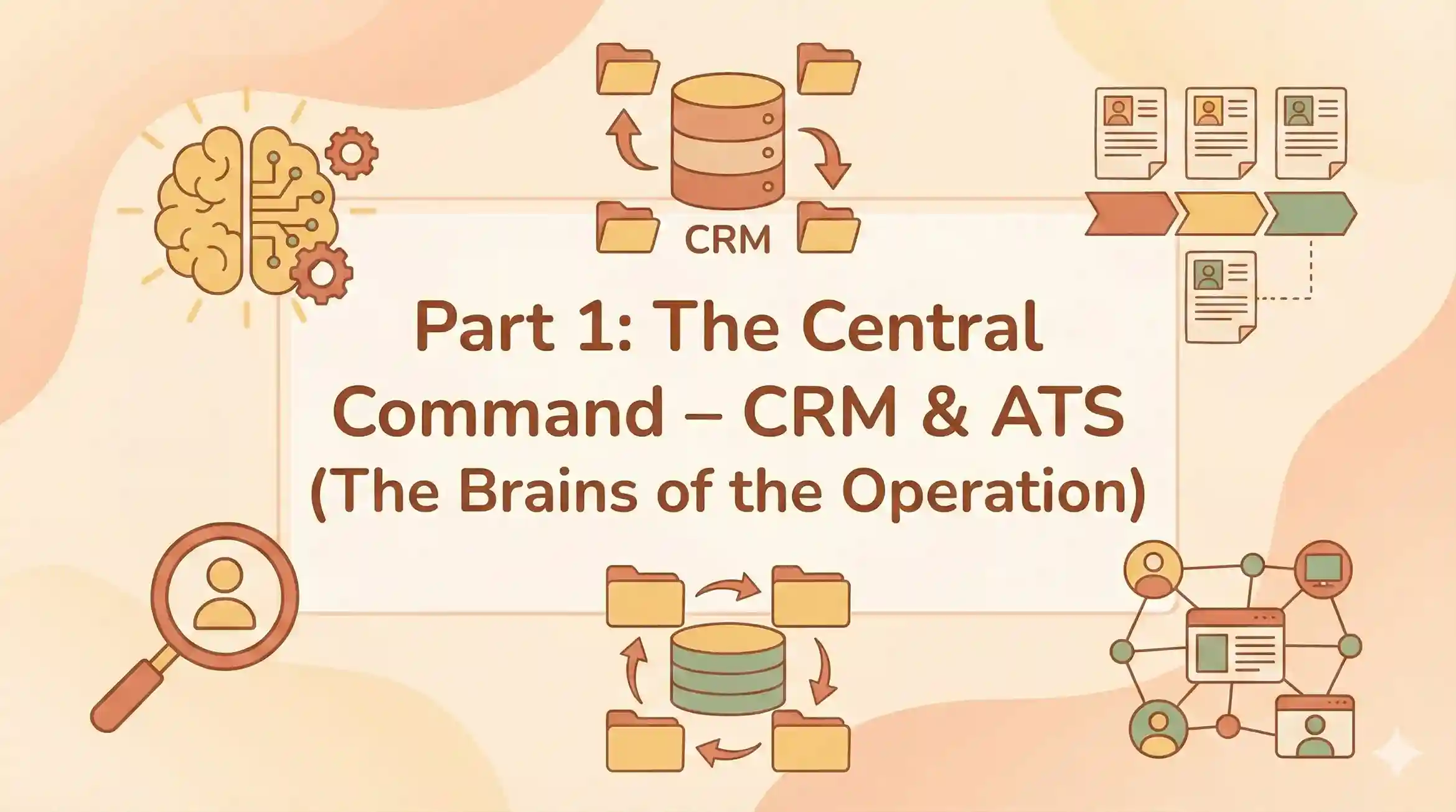
Part 1: The Central Command – CRM & ATS (The Brains of the Operation)
Your Applicant Tracking System (ATS) and Candidate Relationship Management (CRM) software are the central nervous system of your remote recruitment strategy. If these tools are clunky, your whole process slows down. In a remote world, speed is the currency of success. You need a system that can handle the volume of global applicants while maintaining a personal touch.
1. ATZ CRM: The All-in-One Powerhouse for Modern Agencies
Best For: Agencies and high-growth teams needing Sourcing, CRM, and ATS in one platform.
Let’s be honest, juggling five different logins just to hire one person is exhausting. ATZ CRM solves this by unifying the entire recruitment lifecycle. It is designed specifically for the velocity of remote recruitment, where you need to move from “sourced” to “interviewing” in hours, not days. Unlike legacy systems that require months of implementation, ATZ CRM is built for agility.
Why it wins for remote teams:
- Automated Email Outreach: ATZ CRM removes the need for manual list exports by providing integrated email automation tools. By leveraging real-time data within the system, users can craft personalized outreach strategies that effectively nurture relationships and ensure candidate networks remain active and engaged.
- AI Sourcing & Matching: ATZ CRM accelerates the hiring process by combining automated resume analysis with seamless LinkedIn integration and smart matching algorithms. The platform’s machine learning capabilities are designed to filter out irrelevant data; by analyzing past placement history, the system progressively adapts to the user’s preferences, delivering increasingly accurate and personalized results over time.
- Automation with 3-Tiered Workflow: ATZ CRM empowers agencies with a robust, three-tiered automation architecture designed for scalability. By combining native workflow capabilities with Zapier connectivity and a comprehensive Open API, the platform provides a versatile solution for every operational requirement.
- AI Meeting Notetaker: For remote teams living on Zoom, ATZ CRM records, transcribes, and summarizes your interviews automatically. You never lose a detail, even if your internet flickers.
Pricing:
- Unlimited Free Trial: Full access to explore features.
- Competitive Tiers: Generally more affordable than legacy enterprise tools, with transparent pricing for scaling teams.
Pros:
- Combines ATS and CRM in one view (no syncing errors).
- Built-in AI for sourcing and note-taking saves hours of manual work.
- Excellent for agencies handling both client and candidate pipelines.
Cons:
- As a feature-rich platform, new users may need a day or two to explore all the automation capabilities.
Pro Tip: If you are still using spreadsheets to track candidates, you are losing money. It’s time to switch to ATZ CRM and automate your busy work.
If you are looking for the Best Recruitment CRM Software for Recruitment, ATZ CRM should be at the top of your list for its seamless integration of AI and automation.
2.Greenhouse : The Structured Hiring Titan
Best For: Large enterprises focused on compliance and DEI.
Greenhouse is often cited as the gold standard for structured hiring. In remote recruitment, unconscious bias can easily creep in when you never meet candidates face-to-face. Greenhouse combats this with rigorous scorecards and attribute-based evaluation methods.
Key Features:
- Scorecards: Forces interviewers to rate specific attributes rather than general “gut feeling.”
- Automated Surveys: Send candidate experience surveys automatically.
- DEI Nudges: Alerts interviewers to potential bias in their feedback.
Pricing:
- Tiered Model: Starts around $6,000 - $25,000+ per year, depending on company size. It is one of the more expensive options.
Pros:
- Incredible ecosystem of integrations.
- Strong focus on removing bias from hiring.
- Robust reporting for large teams.
Cons:
- High cost makes it prohibitive for small businesses.
- Steep learning curve for hiring managers who just want to “click and hire.”
Comparison: See how it compares in our 12 Best Recruitment CRM Software for Recruitment Agencies guide.
3. SmartRecruiters: The Talent Pool Specialist
Best For: Enterprise-level CRM and talent community management.
SmartRecruiters excels at managing massive “Talent Pools.” In a remote world, you might find a great developer in Poland who isn’t ready to move yet. SmartRecruiters helps you nurture that relationship until the timing is right. Their “SmartAssistant” uses AI to match candidates to jobs, scoring them based on fit.
Key Features:
- SmartAssistant: Uses AI to screen incoming resumes and score them against the job description.
- Collaborative Hiring: Hiring managers can review and rate candidates easily via a mobile app.
- Global Compliance: Strong features for GDPR and global data privacy.
Pricing:
- Enterprise Only: They recently discontinued their “SmartStart” free plan. Enterprise plans typically start around $10,000+ per year.
Pros:
- Excellent candidate experience (easy apply flows).
- Strong collaborative features for distributed hiring teams.
Cons:
- No longer viable for small businesses due to the removal of the free tier.
- Reporting can be rigid compared to tools like Ashby.
Alternative: If you need a cost-effective solution, check out our guide on Discover Free ATS for Small Businesses.
4. Lever: The Relationship-Centric ATS
Best For: Mid-market companies focused on nurturing passive talent.
Lever (LeverTRM) is unique because it was built as a CRM first and an ATS second. This makes it a strong choice for internal talent acquisition teams who prioritize relationship building over transactional hiring. For remote recruitment, where engaging passive candidates is key, Lever’s “Nurture” features allow you to drip-feed emails to talent over months.
Key Features:
- Visual Pipeline: A clean, easy-to-understand interface that hiring managers love.
- Lever Nurture: Automated email campaigns to keep passive candidates warm.
- Fast Resume Review: “Fast Resume Review” mode helps recruiters speed through applications.
Pricing:
- Custom: Pricing is quote-based but generally starts around $3,500 - $5,000/year for smaller teams, scaling up significantly.
Pros:
- Excellent user interface (UI) and user experience (UX).
- Great for collaborative hiring with internal teams.
Cons:
- Reporting can be complex for beginners to set up.
- The CRM features are powerful but may be overkill for simple hiring needs.
5. Ashby: The Analytics Powerhouse
Best For: High-growth tech startups and data-driven recruiting teams.
Ashby has taken the tech world by storm. It is an “all-in-one” platform that combines ATS, CRM, scheduling, and analytics. Its standout feature is its data visualization. Like in ATZ CRM, you can build custom dashboards to track every metric imaginable without needing a separate Business Intelligence tool.
Key Features:
- Custom Dashboards: Build granular reports on “Time to Hire” per region or “Pass-through Rate” per interviewer.
- Automated Scheduling: Built-in scheduling links similar to Calendly.
- Sourcing: Direct integration with LinkedIn for profile scraping.
Pricing:
- Premium: Starts around $300-$400 per month for smaller teams.
Pros:
- Best-in-class analytics capabilities.
- Modern, fast, and flexible.
Cons:
- Steep Learning Curve: The sheer number of settings can be overwhelming.
- US-Centric: Some global compliance features are still catching up compared to legacy giants.
6. Workable: The Rapid Deployment Option
Best For: SMBs and teams that need to start hiring immediately.
Workable is known for its ease of use. It is designed to post your job to over 200 job boards with a single click. For remote teams that don’t have a dedicated HR Ops person to configure complex software, Workable is a “plug and play” solution.
Key Features:
- AI Recruiter: Automatically suggests candidates from their database of 400M+ profiles.
- Mobile App: Excellent for hiring managers on the go.
- Global Job Posting: One-click distribution to LinkedIn, Indeed, and specialized remote boards.
Pricing:
- Starter: Starts around $149 - $169 per month.
Pros:
- Incredibly easy to set up (you can be live in 10 minutes).
- Strong sourcing tools built in.
Cons:
- It can get expensive as you scale up features.
- Support tiers vary significantly by plan.

Part 2: The Sourcing Engine – Finding Needles in Global Haystacks
The world is your talent pool, but that makes the haystack bigger. Sourcing tools for remote recruitment need to filter by time zone, remote willingness, and digital skill sets. You can’t just post and pray anymore.
7. LinkedIn Recruiter: The Global Directory
Best For: Accessing the world’s largest professional network.
It’s the tool everyone loves to hate, but no one can live without. LinkedIn Recruiter remains essential because of its sheer volume (1 billion+ members).
Key Features:
- Open to Remote Work: The single most critical filter for distributed teams.
- Spotlight: Highlights candidates “More likely to respond” or “Open to work.”
- InMail: Direct messaging to passive candidates.
Pricing:
- Recruiter Lite: ~$170/month.
- Corporate: ~$8,999/year per seat (varies by contract).
Pros:
- Unrivaled database size.
- Standard tool for most professionals.
Cons:
- Expensive: One of the costliest tools in the stack.
- InMail Limits: Even expensive plans have caps on messages.
Optimization: Master your outreach with 10 Best AI & ChatGPT Prompts Every Recruiter Should Be Using.
8. hireEZ (formerly Hiretual): The Deep Web Hunter
Best For: Sourcing technical talent and finding personal emails.
When the perfect engineer isn’t on LinkedIn, they are likely on GitHub or Stack Overflow. hireEZ aggregates data from the open web to build holistic profiles.
Key Features:
- Contact Finding: Locates personal emails and phone numbers (higher success rate than LinkedIn).
- AI Sourcing: You input the JD, and it builds the Boolean string.
- Diversity Filters: Specific filters for underrepresented groups.
Pricing:
- Professional: Approx $169 - $199 per month.
Pros:
- Finds candidates who aren’t active on LinkedIn.
- Strong contact info accuracy.
Cons:
- Pricey: Can be expensive for small agencies.
- Data Accuracy: Occasionally pulls outdated info from old profiles.
9. SeekOut: The Diversity Champion
Best For: Hitting DEI goals in tech hiring.
SeekOut is a powerhouse for diversity sourcing and technical recruiting. It allows you to search for candidates based on their actual code contributions on GitHub, not just keywords.
Key Features:
- Blind Hiring Mode: Hides names/photos to reduce unconscious bias.
- GitHub Search: Deep analysis of developer code repositories.
- Security Clearance Filters: Vital for gov-tech roles.
Pricing:
- Enterprise: Starts around $499/month (often sold in annual contracts of $10k+).
Pros:
- Best-in-class diversity filters.
- Excellent for hard-to-fill engineering roles.
Cons:
- Very expensive; aimed primarily at enterprise teams.
10. Himalayas: The Remote-Native Job Board
Best For: Attracting candidates who get remote culture.
Generalist job boards like Indeed are great, but for remote recruitment, they are often too broad. Himalayas is a dedicated remote job board that lets you filter candidates by Time Zone Overlap.
Key Features:
- Time Zone Filtering: “Must overlap 4 hours with GMT-5.”
- Tech Stack Filtering: Candidates search by tools they use (e.g., “React” + “Slack”).
- Company Culture Profiles: Deep dives into your remote benefits.
Pricing:
- Per Post: Typically ranges from free basic posts to premium sponsored slots.
Pros:
- High-quality applicants who understand remote work.
- Reduces scheduling headaches by filtering for time zones upfront.
Cons:
- Smaller candidate volume compared to LinkedIn/Indeed.
11. RemoteOK (and We Work Remotely)
Best For: Finding contractors and digital nomads.
These platforms are the OGs of remote work. They attract a specific breed of candidate: self-starters who are comfortable managing their own time and tech.
Key Features:
- Global Reach: Access to talent in low-cost-of-living regions.
- Tagging System: Easy to filter for “Dev,” “Marketing,” or “Finance.”
Pricing:
- Pay per Post: ~$299 per job post, usually.
Pros:
- Simple, no-nonsense interface.
- Signals you are a “cool” remote-first company.
Cons:
- Can get flooded with applications, requiring a strong ATS like ATZ CRM to filter them.
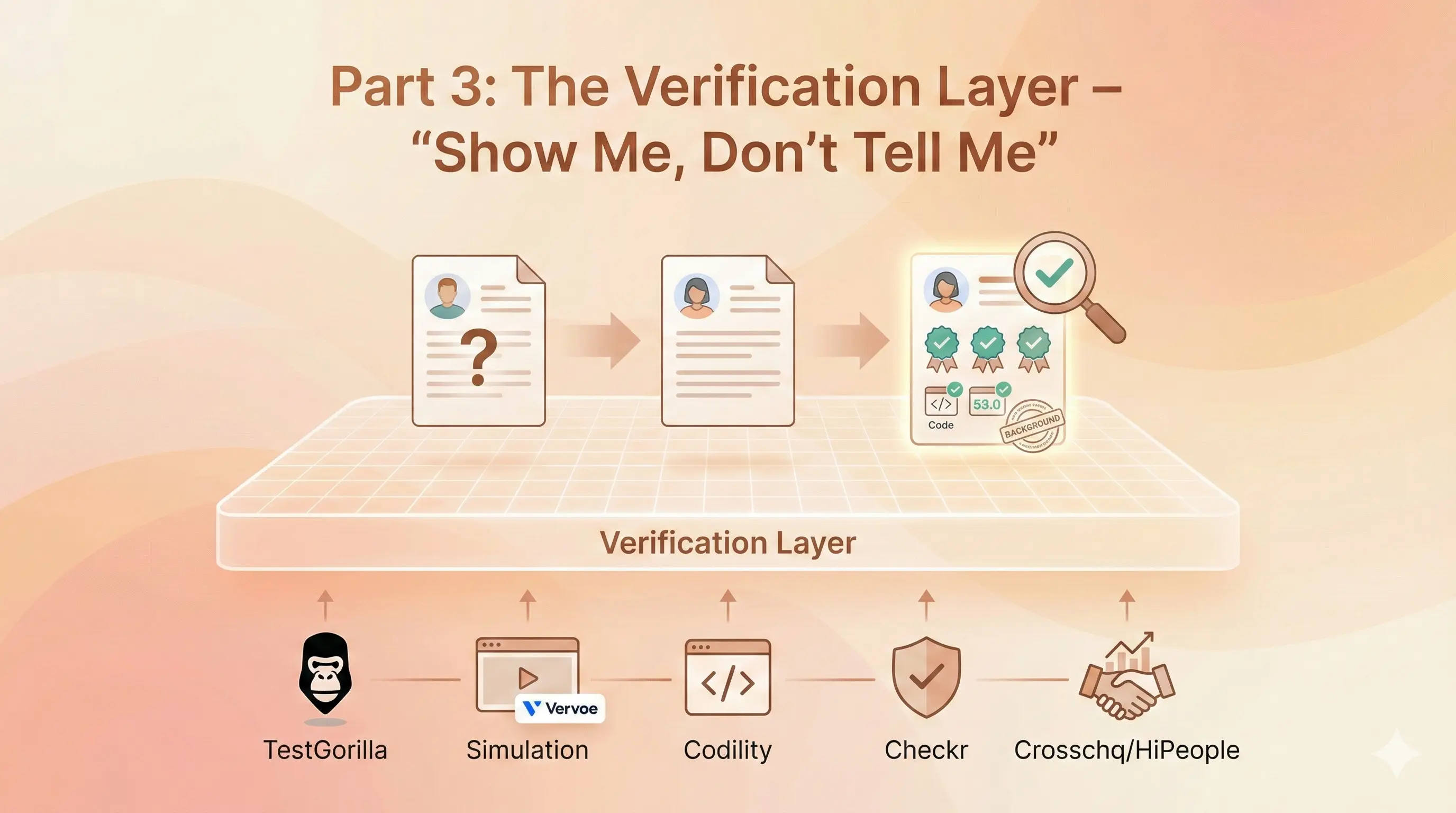
Part 3: The Verification Layer – “Show Me, Don’t Tell Me”
In a traditional interview, you might rely on a firm handshake or “presence.” In remote recruitment, those signals don’t exist. You need empirical data to verify skills. Today’s rule is simple: Demonstration over explanation.
12. TestGorilla: The Pre-Employment Standard
Best For: Testing soft skills and cultural add.
Resumes can be exaggerated. TestGorilla lets you test candidates before you interview them.
Key Features:
- Remote Work Soft Skills Test: Assesses time management and communication.
- Anti-Cheating: Snapshots and IP logging.
- One-Way Video: Candidates answer text questions via video.
Pricing:
- Free Plan: Limited tests.
- Starter: ~$75/month.
Pros:
- Huge library of tests (300+).
- Great user experience for candidates.
Cons:
- Credit-based pricing can get confusing.
13. Vervoe: The Job Simulator
Best For: Seeing candidates in action (Support, Sales, Writing).
Vervoe replaces multiple-choice questions with “Job Simulations.” You can ask a support agent to write a response to an angry client.
Key Features:
- AI Grading: Automatically grades open-ended responses.
- Immersive Questions: Use code, video, or text.
Pricing:
- Starter: ~$79/month.
Pros:
- Reduces screening time by 80%.
- “Audition” style is fairer than resume screening.
Cons:
- AI grading isn’t perfect; requires human spot-checks.
14. Codility: The Code Check
Best For: Hiring developers remotely.
For tech roles, Codility is the industry standard. It allows for live pair programming, which helps you see how a developer thinks.
Key Features:
- CodePlayback: Watch a replay of the coding session.
- Pair Programming: Live coding environment.
Pricing:
- Scale: ~$6,000/year (or $600/mo).
Pros:
- Deep insight into technical ability.
- Reduces false positives in engineering hiring.
Cons:
- Expensive for small teams.
15. Checkr: The Trust Layer
Best For: Automated background checks.
In a remote world, trust is everything. Checkr provides modern, AI-driven background checks.
Key Features:
- AI Speed: 84% of checks are ready in under 15 minutes.
- Global: International checks available.
Pricing:
- Per Check: Starts at $29.99/check.
Pros:
- Fast and mobile-friendly for candidates.
- Integrates with most ATS platforms.
Cons:
- Pass-through fees for some counties can add up.
16. Crosschq: Quality of Hire
Best For: Reference checks and analytics.
Crosschq automates reference checks, turning them into data points about “Quality of Hire.”
Key Features:
- 360 References: Surveys former managers and peers.
- Fraud Detection: Flags suspicious references (e.g., same IP address).
Pricing:
- Custom: Enterprise pricing.
Pros:
- Removes the drudgery of calling references.
- Data-driven insights on candidate past performance.
Cons:
- Overkill for low-volume hiring.
17. HiPeople: Reference Insights
Best For: Fast, automated reference collection.
HiPeople verifies skills and culture fit through automated reference surveys.
Key Features:
- Fraud Detection: Ensures references are real.
- Skill Verification: Asks references to rate specific skills.
Pricing:
- Custom: Based on usage.
Pros:
- Beautiful interface.
- Fast turnaround.
Cons:
- Pricing is not transparent on the website.
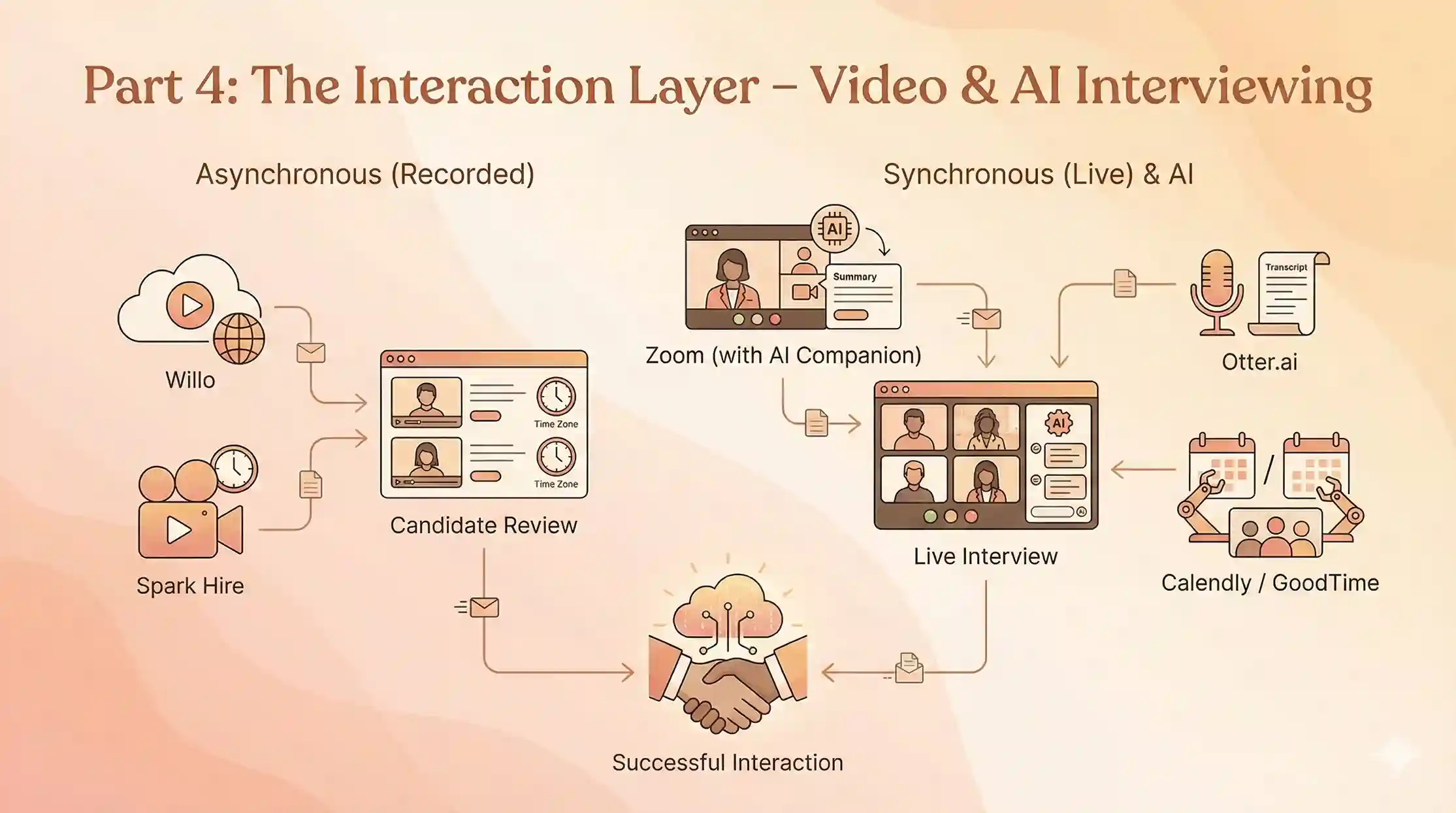
Part 4: Connecting with Talent – Video Tools & AI Coordination
Video fatigue is real. The best tools for remote recruitment mix synchronous (live) and asynchronous (recorded) video to respect everyone’s time.
18. Willo: The Asynchronous Time Saver
Best For: Screening candidates across time zones.
Scheduling a screening call between London and Sydney is a nightmare. Willo allows you to send questions that candidates answer on video in their own time. You review them when you wake up.
Key Features:
- No App Needed: Browser-based.
- ID Verification: Ensures the candidate is who they say they are.
Pricing:
- Growth: ~$249/month.
Pros:
- Solves time zone issues perfectly.
- Standardizes the interview process.
Cons:
- Some candidates find one-way video impersonal.
19. Spark Hire: The Video Interview Suite
Best For: SMBs needing a simple video solution.
Spark Hire provides support for both real-time and pre-recorded interview formats. It’s affordable and integrates with most ATS platforms.
Key Features:
- Interview Collaboration: Share videos with managers easily.
- Scheduler: Built-in scheduling tool.
Pricing:
- Pro: ~$299/month.
Pros:
- Easy to use.
- Good support.
Cons:
- Interface is functional but not “slick.”
20. Zoom (with AI Companion): The Live Standard
Best For: Final rounds and panel interviews.
You are likely already using Zoom, but are you using the AI Companion?
Recruitment Hack: Use Zoom’s AI to summarize the interview and highlight action items. It saves you from scribbling notes and lets you focus on the candidate.
Integration: ATZ CRM integrates directly with Zoom to log these meetings automatically.
Key Features:
- AI Summary: Summarizes the call automatically.
- Smart Recording: Highlights key moments.
Pricing:
- Included in Business plans (~$20/user).
Pros:
- Everyone knows how to use it.
- Stable quality.
Cons:
- AI features are generic, not recruiter-specific.
21. Otter.ai: The AI Notetaker
Best For: Transcribing interviews so you never miss a detail.
If your ATS doesn’t have a built-in notetaker (unlike ATZ CRM, which has an AI Meeting Notetaker built in!), Otter.ai is a great standalone tool. It connects to your calendar and automatically joins calls to transcribe them. It differentiates between speakers, making it easy to review who said what.
22. Calendly: The Scheduler
Best For: Eliminating email ping-pong.
“Are you free Tuesday at 2? No? How about Wednesday?” Stop doing this. Calendly lets candidates book time directly on your calendar.
Integration: It syncs with your ATS to ensure that when an interview is booked, the candidate’s status is updated automatically.
Routing: You can use routing forms to send candidates to the right recruiter based on their answers.
Key Features:
- Round Robin: Distributes interviews to available team members.
- Workflows: Sends SMS reminders.
Pricing:
- Teams: ~$16/user/mo.
Pros:
- Candidate-friendly.
- Simple setup.
Cons:
- Paywall for essential features like workflows.
23. GoodTime: The Scheduling Automator
Best For: Complex panel interviews.
For enterprise teams, Calendly might be too simple. GoodTime uses AI to schedule complex panel interviews, taking into account interviewer load balancing and training status. It ensures you aren’t burning out the same three engineers with interviews every week.
Key Features:
- Panel Scheduling: Coordinates 5+ people instantly.
- Load Balancing: Ensures no interviewer is burnt out.
Pricing:
- Growth: ~$1250/month.
Pros:
- Handles complex logistics effortlessly.
- Great for large tech teams.
Cons:
- Too expensive for small teams.
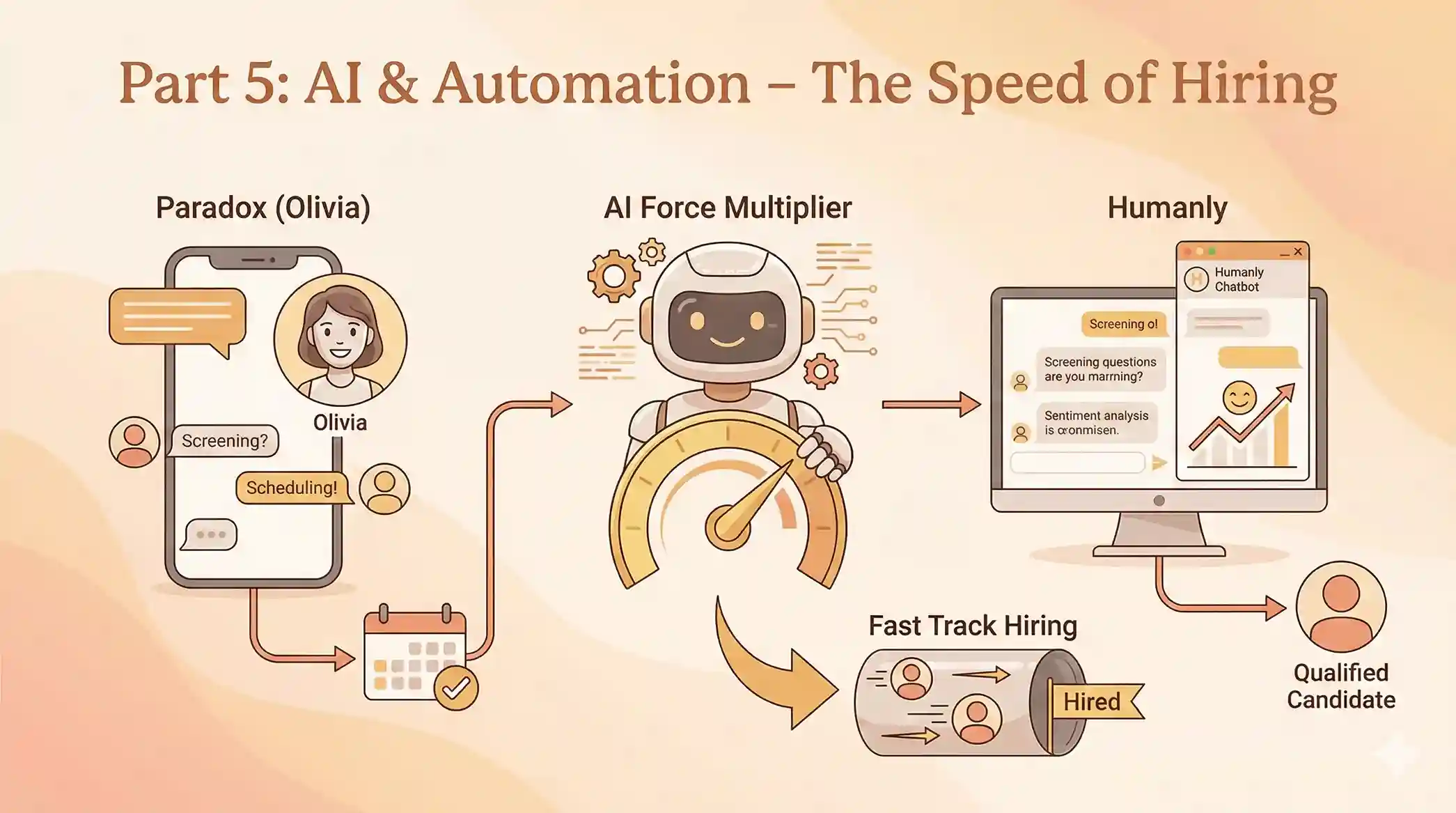
Part 5: AI & Automation – The Speed of Hiring
Today, if you aren’t using AI, you are already behind. These tools act as force multipliers for your team.
24. Paradox (Olivia): The Conversational AI
Best For: High-volume hiring and instant screening.
Paradox’s AI assistant, “Olivia,” can screen candidates via text message/WhatsApp, answer their questions 24/7, and schedule interviews automatically.
Why use it: For high-volume remote roles (like customer support), speed is everything. Olivia ensures zero lag time between application and engagement.
25. Humanly: The Chatbot for High Volume
Best For: Screening and scheduling at scale.
Humanly engages candidates instantly via chat. It screens them based on your knockout questions and schedules the qualified ones immediately. It also measures candidate sentiment, helping you improve your employer brand in real-time.
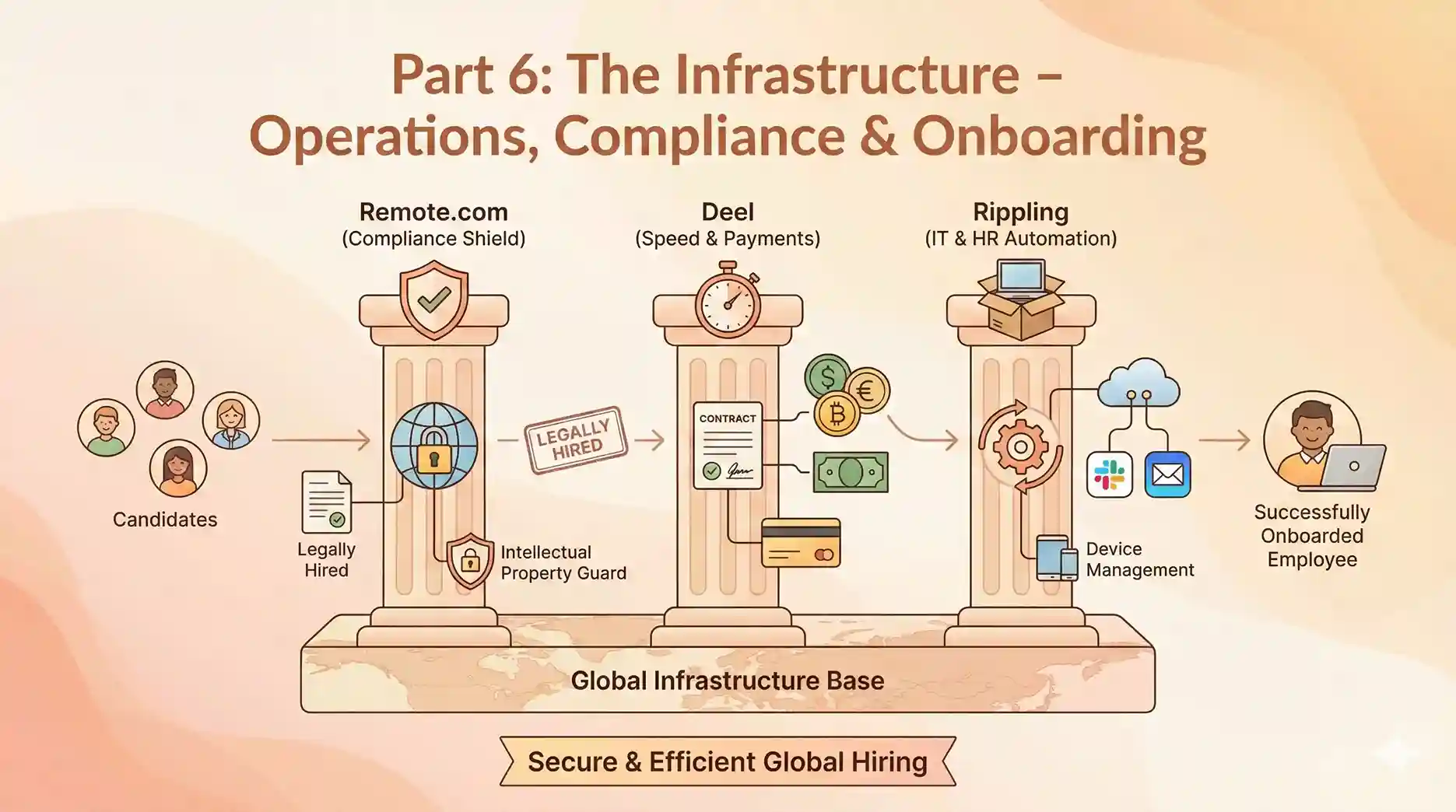
Part 6: The Infrastructure – Operations, Compliance & Onboarding
You found them. You liked them. Now, how do you legally hire them in a country where you don’t have an office? This is where the rubber meets the road in remote work.
26. Remote.com: The Compliance Shield
Best For: Hiring full-time employees in countries where you lack an entity.
Remote.com acts as the Employer of Record (EOR). They hire the candidate locally, handle taxes/payroll, and lease the employee back to you.
Key Advantage: They own their own entities in most countries (vs. using third parties), which offers better IP protection for your company. This is crucial for tech companies hiring developers.
Key Features:
- Owned Entities: Better IP protection.
- Remote IP Guard: Protects your intellectual property.
Pricing:
- EOR: $599/employee/month.
- Contractor: $29/month.
Pros:
- Flat pricing (no percentages).
- Strong legal framework.
Cons:
- Can be pricey for very small teams.
27. Deel: The Speed King
Best For: Hiring contractors and fast scaling.
Deel is famous for its speed. You can generate a compliant contract for a contractor in 150+ countries in minutes. They also offer flexible payment options, including crypto, which is popular with digital nomads.
Global Payroll: They also offer a unified global payroll solution if you decide to set up your own entities later.
Key Features:
- Crypto Payments: Pay contractors in crypto.
- Deel Card: Instant access to funds.
Pricing:
- EOR: Starts $599/mo.
- Contractor: $49/mo.
Pros:
- Incredibly fast onboarding.
- Flexible payment options.
Cons:
- Support can be slow during peak times.
28. Rippling: The IT + HR Hybrid
Best For: Automating onboarding logistics.
Hiring remotely is easy; getting a laptop to the new hire is hard. Rippling solves this. It creates a seamless link between Human Resources and the IT department.
Magic Trick: When you hire someone in Rippling, it can automatically ship them a configured laptop, create their email, set up their Slack account, and add them to payroll, all in one workflow. If they leave, it locks the device remotely. It’s the ultimate tool for remote recruitment operations.
Key Features:
- Device Management: Ships and manages laptops.
- App Provisioning: Sets up Slack/Email instantly.
Pricing:
- Core: Starts $8/user/mo (modular add-ons).
Pros:
- The “Magic” of IT and HR combined.
- Saves massive admin time.
Cons:
- Implementation can be complex if switching from legacy systems.
Recruiter Joke Break:
Recruiter: “Why did you leave your last job?”
Candidate: “The company relocated the office and forgot to tell me where the new one was.”
Recruiter: “Well, that’s one way to go remote!”
Bonus Tools: The Essential “Plumbing”
While we listed 28, you can’t run a remote team without these honorable mentions:
- Slack: The virtual office. Integrate your ATS (like ATZ CRM) into Slack, so your team gets notified of new applicants instantly.
- DocuSign: The closer. Digital signatures are legally binding and necessary for remote offer letters.
Conclusion:
The “best tools for remote recruitment” are the ones that talk to each other. A fragmented tech stack where data lives in silos is a recipe for disaster. You don’t want to be copy-pasting data from your video interview tool to your ATS.
Your Recommended Workflow:
- Source via ATZ CRM.
- Engage using ATZ CRM’s Automated Sequencing.
- Verify skills early with TestGorilla.
- Interview using Zoom (with AI notes) and Calendly.
- Hire Compliantly with Remote.com or Deel.
- Onboard instantly with Rippling.
By centralizing your operations on a robust platform like ATZ CRM, you ensure that you aren’t just collecting tools; you are building a hiring machine.
Are you ready to modernize your hiring stack?
Don’t let manual tasks slow you down. Experience the power of AI-driven remote recruitment.
Frequently Asked Questions (FAQs)
1. What is the most important tool for remote recruitment?
An all-in-one ATS/CRM like ATZ CRM is critical. It acts as the central hub for your data, communication, and automation. Without a strong central system, other tools (like video interviewing or assessments) will create data silos and confusion.
2. How do I reduce bias in remote interviews?
Use structured hiring tools like Greenhouse and skill assessments like TestGorilla or Codility. These tools ensure you are evaluating candidates based on data and proven skills rather than “gut feeling,” which is often unreliable in video calls.
3. Can I hire someone in a country where I don’t have an office?
Yes, absolutely. You need an Employer of Record (EOR) service like Remote.com or Deel. They act as the legal employer, handling local labor laws, taxes, and payroll, while the employee works for you day-to-day.
4. What is the difference between synchronous and asynchronous video interviews?
Synchronous interviews happen live (e.g., via Zoom). Asynchronous interviews (e.g., via Willo or Spark Hire) allow candidates to record video answers to questions on their own time, which recruiters review later. Asynchronous is best for screening; synchronous is best for final rounds.
5. How can AI help in remote recruitment?
AI helps in three main ways: Sourcing (finding candidates), Screening (ranking resumes or grading tests), and Automation (scheduling interviews and sending emails). Tools like ATZ CRM use AI to match candidates to jobs and automate outreach, saving recruiters hours every week.
Blog Summary:
Part 1: CRM & ATS (Central Command)
- ATZ CRM: The all-in-one powerhouse for agencies. Features automated data enrichment, 3-tiered automation workflows, and AI sourcing.
- Greenhouse: Enterprise standard for structured hiring and DEI compliance.
- SmartRecruiters: Best for managing large talent pools and enterprise collaboration.
- Lever: Relationship-centric ATS+CRM, ideal for nurturing passive talent.
- Ashby: Analytics-heavy platform for high-growth tech startups.
- Workable: Rapid deployment solution for SMBs needing to hire immediately.
Part 2: Sourcing Engines
- LinkedIn Recruiter: The essential global database.
- hireEZ: Deep web hunter for finding personal contact info (emails/numbers).
- SeekOut: Diversity and tech-focused sourcing with blind hiring features.
- Himalayas: Remote-native job board filtering by Time Zone Overlap.
- RemoteOK / We Work Remotely: Top boards for digital nomads and contractors.
Part 3: Verification (Show, Don’t Tell)
- TestGorilla: Pre-employment assessments for soft skills and culture add.
- Vervoe: AI-graded job simulations (real-world tasks vs. multiple choice).
- Codility: The standard for technical/coding assessments.
- Checkr: AI-driven, mobile-friendly background checks.
- Crosschq & HiPeople: Automated reference checks and “Quality of Hire” analytics.
Part 4: Interaction (Video & Scheduling)
- Willo & Spark Hire: Asynchronous video interviewing to solve time zone conflicts.
- Zoom (AI Companion): The standard for live interviews with AI summaries.
- Otter.ai: Automated transcription and note-taking.
- Calendly: Eliminates scheduling emails; syncs with ATS.
- GoodTime: AI automation for complex enterprise panel scheduling.
Part 5: AI & Automation
- Paradox (Olivia) & Humanly: Conversational AI assistants for 24/7 high-volume screening and scheduling.
Part 6: Infrastructure (Compliance & Onboarding)
- Remote.com: EOR with owned entities for IP protection.
- Deel: Fastest onboarding for contractors and crypto payments.
- Rippling: Automates IT (laptop shipping) and HR (payroll) in one workflow.
Bonus & Conclusion
Slack & DocuSign are the essential plumbing for communication and contracts. Winning Strategy: Centralize data in ATZ CRM, verify early with TestGorilla, and onboard fast with Rippling.