
Last Updated: · ATZ CRM Editorial Team · Recruitment Tools · 14 min read
Boolean Search in Recruitment: The Complete Beginner’s Guide
Today’s recruiters need to be proactive in finding hidden talent that might not even be looking for a job. That’s where Boolean search comes in.
Quick Answer: Boolean Search in Recruitment: The Basics
Quick answer: Boolean search uses logical operators (AND, OR, NOT) and modifiers (quotes, parentheses, wildcards) to filter search results with precision. Example:
"product manager" AND (SaaS OR fintech) NOT junioron LinkedIn finds experienced PM candidates in specific industries. No coding knowledge required.
Boolean Search in Recruitment: The Complete Beginner’s Guide
Recruitment is more than just posting job ads and waiting for applicants to roll in. Today’s recruiters need to be proactive in finding hidden talent that might not even be looking for a job. That’s where Boolean search comes in. If you’ve ever wondered how some recruiters seem to magically find perfect candidates on LinkedIn or Google while others struggle, the secret often lies in mastering Boolean search. Don’t worry, it’s not as complicated as it sounds. This guide will walk you through the basics in plain English, with real examples and practical tips you can use right away.
What Is Boolean Search and Why Does It Matter in Recruitment
At its core, Boolean search is a smart way to use keywords and symbols to get more accurate search results. Named after mathematician George Boole, it’s a technique that lets you combine words and phrases using logical operators like AND, OR, and NOT. In simple terms, Boolean search helps recruiters filter out irrelevant results and find the best candidates faster. For example, if you’re searching for a software developer who knows Python but not Java, a Boolean search can help you do exactly that, saving you hours of scrolling through profiles that don’t fit. In recruitment, Boolean search is used across platforms from LinkedIn and Indeed to Google and internal databases. It helps you go beyond the surface level and uncover profiles that match your specific needs. Think of it as building your own smart filter, one that understands what you want and what you don’t.
Related Read: The Best Bullhorn Alternative for Effortless Hiring
Understanding the Basics – Boolean Logic Explained Simply
Boolean logic may sound technical, but it’s really just about combining ideas with logic. The basic concept is to narrow down or expand your search results by using certain words or symbols called operators. Imagine you’re searching for resumes online. Instead of typing random words like graphic designer remote, you can use Boolean logic to say: “I want results that have both graphic designer AND remote work.” Or you could say: “Show me profiles with graphic designer OR illustrator.” In other words, Boolean logic helps the search engine understand your intention better. It makes your searches precise, focused, and much more powerful.
Related Read:12 Best Recruitment CRM Software for Recruitment Agencies
Global Boolean Operators and Their Meanings
Let’s go over the most commonly used Boolean operators in recruitment. Once you understand these, you’ll already be ahead of many beginner recruiters.
1. AND
The AND operator is used to include multiple conditions in your search. It tells the system to show only results that contain all the terms you specify. Example: Java AND Python This will show candidates who know both Java and Python.
2. OR
The OR operator broadens your search. It’s used when you’re open to multiple options or similar skill sets. Example: Designer OR “UI/UX” OR “Graphic Artist” This will show candidates who have any one of these keywords.
3. NOT (or the minus sign “–”)
The NOT operator is used to exclude specific words from your search results. Example: (“Digital Marketing Manager” OR “SEO Specialist”) AND (“Google Ads” OR “Meta Ads”) AND (“New York” NOT “Remote”) Here’s a quick preview of how it appears in Google results:
This query will display profiles of Digital Marketing Managers or SEO Specialists who have experience with Google Ads or Meta Ads. 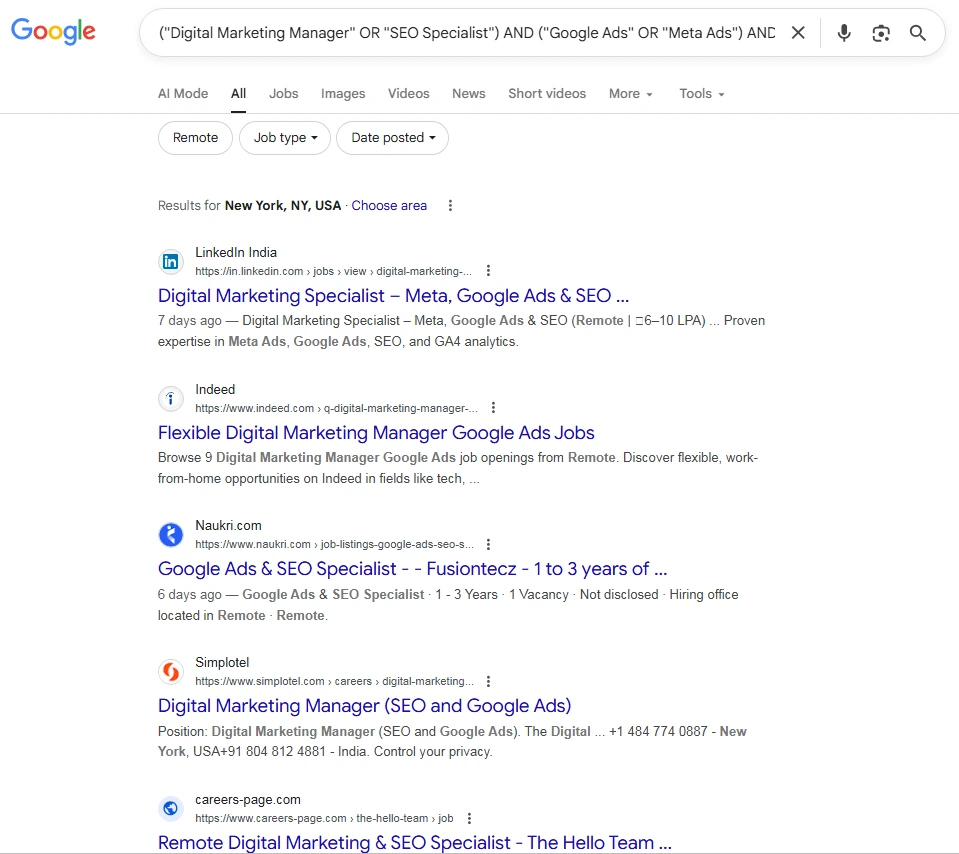
Related Read:Cold Call Script: Recruit Better With These 6 Free Scripts
Special Operators for Precision Searches
Once you’re comfortable with the globals, these special operators help you refine your search even further for maximum precision.
1. Quotation Marks (” ”)
Use quotation marks when you want to search for exact phrases. Example: “Project Manager” Without the quotes, you might get results for “Project” or “Manager” separately. With quotes, you only get profiles containing that exact phrase.
Related Read: Top 10 Free ATS Tools to Supercharge Recruitment - ATZCRM
2. Parentheses ( )
Parentheses help group search terms logically. They’re very useful when you combine different operators. Example: (“Front End” OR “Frontend” OR “UI Developer”) AND (React OR Angular) This tells the system to look for profiles that match any of the front-end titles and either React or Angular skills.
Related Read: Steal These Free Recruiting Email Templates That Get Responses
3. Asterisk (*)
The asterisk acts as a wildcard, which helps you search for word variations. Example: Develop* will bring up results for developer, development, and developing. This saves you from typing every possible variation.
How Boolean Search Works in Recruitment

Now that you know the operators, let’s see how they actually work in the recruitment process.
Recruiters often use Boolean searches in:
LinkedIn Recruiter
Google (for X-Ray searches)
Job boards (Indeed, Monster, Naukri, etc.)
Applicant Tracking Systems (ATS)
When you use a Boolean search, you’re telling the system exactly what you’re looking for, not just relying on its default algorithms.
For example, typing this into LinkedIn’s search bar: (“Data Scientist” OR “Machine Learning Engineer”) AND (“Python” OR “R”) AND (“Mumbai” OR “Bangalore”) NOT “Intern”
Will show candidates who:
Have either Data Scientist or Machine Learning Engineer in their profile
Know either Python or R
Are located in Mumbai or Bangalore
Are not interns
Related Read: Best RecruiterFlow Alternatives for Recruiting Firms
This level of precision gives you fewer but higher-quality results, saving time and effort.
Common Mistakes Beginners Make
If you’re new to Boolean search, it’s normal to make a few mistakes. Let’s look at the most common ones and how to fix them.
1. Forgetting Quotation Marks
Without quotes, your search may bring irrelevant results. For example: Project Manager may also show Project Coordinator or Manager Sales. Use “Project Manager” to be precise.
2. Mixing Operators Incorrectly
Always use parentheses when combining multiple operators. For example, Java AND Python OR SQL is confusing. Instead, use: Java AND (Python OR SQL) - this gives a more accurate result.
Related Read: The Ultimate Recruit CRM Showdown: Best ATS Ranked
3. Overusing NOT
Excluding too many terms can make your search too narrow. Use NOT sparingly.
4. Ignoring Word Order
Search engines prioritize certain words. Put the most important keywords first.
5. Not Testing Your Strings
Run your Boolean search, check a few profiles, and tweak if needed. A small change can improve your results drastically.
Tips to Refine Boolean Searches and Get Better Results
Even the best Boolean search can give you too many or too few results. Here are some quick tips to make your searches sharper and more effective:

Related Read: 8 Best ATS+CRM Loxo alternatives for Growing teams
1. Start Broad, Then Narrow Down
Begin with a wider search using OR, and gradually add AND or NOT to narrow your list.
2. Use Synonyms
People describe the same role differently. For example, someone might write “Front-End Developer,” while another says “UI Engineer.” Include all variations using OR.
3. Combine Keywords with Location
Always add location-based terms to refine your results, especially when hiring for on-site roles.
4. Check for Spelling Variations
Include alternate spellings, for example, “Javascript” OR “JavaScript”.
5. Keep Updating Your Strings
The job market evolves. New tools, titles, and technologies appear often. Keep updating your Boolean strings accordingly.
6. Test and Save Your Searches
Many platforms let you save searches. Test a few versions, check which gives the best results, and reuse them later.
Advantages of Mastering Boolean Search for Recruiters
Learning Boolean search gives recruiters a real edge. Here’s why it’s worth the effort:
1. Saves Time
You get relevant candidates faster, cutting hours of manual searching.
2. Improves Candidate Quality
You can pinpoint profiles that match exactly what the role requires.
3. Reduces Cost per Hire
By finding the right candidates faster, you minimize the time a position stays vacant.
4. Expands Your Reach
You can find passive candidates who aren’t actively applying but are perfect fits.
5. Works Across Platforms
Whether it’s LinkedIn, Google, or your ATS, Boolean logic works almost everywhere.
6. Makes You a Smarter Recruiter
When you master Boolean search, you gain control over your sourcing process; you’re no longer relying on algorithms or luck.
How ATZ CRM Helps Recruiters Simplify Boolean Search
Modern recruiters need smart tools that go beyond simple keyword searches, and that’s where ATZ CRM steps in. It combines the power of Boolean logic with advanced, field-level filtering, helping recruiters find exactly what they need without wasting time on irrelevant results.
Related Read: Customer Relationship Management 101: Everything Important You Need to Know in 2026
Let’s look at how ATZ CRM makes Boolean search effortless and highly effective.
1. Using Boolean Search in ATZ CRM
Boolean search in ATZ CRM allows you to apply logical operators such as AND, OR, and NOT to refine your results. This is especially useful when you’re searching through resumes, contacts, job listings, or notes — ensuring every search gives you precise, meaningful results. Steps to Use Boolean Search
Step 1: Select the Boolean Search Option You can use a Boolean search for multiple entities: Candidates Contacts Organisations Deals Jobs
Step 2: Enter Your Search Query Use the following operators to refine your search: AND: Automatically applied between terms. For example, searching “Rishita AND Student” shows only records containing both words.
OR: Expands your search. For example, “Student OR Teacher” returns results containing either keyword.
NOT: Excludes unwanted results. For example, “Senior NOT Student” displays all records with “Senior” but not “Student.”
- Step 3: Click on “Apply Filters” Once your query is ready, click Apply Filters to view results that exactly match your search conditions.
- Step 4: Review Refined Results ATZ CRM instantly displays the most relevant results, allowing you to quickly locate the right candidate, contact, or job entry.
Related Read: Recruitment Strategies for Agencies: Proven Tactics to Attract Better Candidates
2. Filter Types in Advanced Search
While Boolean search handles keywords and logical combinations, Advanced Search in ATZ CRM takes things further by letting you apply specific filters at the field level. This combination of Boolean logic + filters gives recruiters unmatched precision and control. ATZ CRM’s Advanced Search includes a variety of filters designed to fit different search scenarios:
Is Equal To – Finds an exact match for your value. Example: Candidates located in “Delhi.”
Not Equal To – Excludes specific values. Example: Remove candidates without a specific skill.
Is Available – Shows records with a value in a field. Example: Candidates who have a phone number listed.
Not Available – Finds records missing certain information. Example: Candidates without an email address.
Starts With – Searches records beginning with a keyword. Example: Jobs starting with “Product.”
Ends With – Finds records ending with a keyword. Example: Job titles ending in “Manager.”
Is Less Than – Filters values below a certain number. Example: Candidates expecting salaries below $50,000.
Greater Than – Filters values above a number. Example: Candidates seeking salaries above $100,000.
Between – Finds values within a defined range. Example: Jobs offering salaries between $60,000 and $80,000.
Contains All Of – Finds records containing all specific words or phrases. Example: Candidates with “marketing” and “SEO” in their profile.
Contains None Of – Excludes records containing specific keywords. Example: Contacts that don’t include the title “Manager.”
Is One Of – Finds records with any one of multiple values. Example: Candidates with either “marketing” or “accounting” skills.
Before – Filters based on dates earlier than the given value. Example: Candidates last updated before Jan 1, 2024.
After – Filters based on dates later than the given value. Example: Candidates updated after Feb 15, 2024.
Related Read: 10 Best AI & ChatGPT Prompts Every Recruiter Should Be Using
Why Recruiters Love ATZ CRM’s Search Tools
By blending Boolean search with smart filters, ATZ CRM ensures you: Spend less time scrolling through irrelevant profiles.
Get access to high-quality, targeted candidate results.
Manage large datasets with ease and clarity.
Save time and boost hiring efficiency.
Advanced Tips and Modern Variations
Once you’re comfortable with the basics, try these advanced techniques to boost your Boolean skills.
Use Wildcards () Smartly Wildcards help capture variations like developer, development, and developing. Example: Develop AND (Python OR Java)
Use Site Searches (Google X-Ray) The site: command in Google helps you search within a specific website. Example: site:linkedin.com/in (“UI Designer” AND “Figma”) AND “Pune”
Related Read: 7 Simple Job Rejection Email Templates That Save Time
Combine Boolean with Filters On LinkedIn, you can combine Boolean searches with built-in filters like Location, Industry, and Experience level.
Search by Job Titles and Skills Together Example: (“HR Manager” OR “Talent Acquisition”) AND (“Employee Engagement” OR “Recruitment Strategy”)
Related Read: Related Read: 15 Free Job Posting Sites USA-Based Recruiters Can Use to Look for Diverse Talent
Use Filetype Searches You can find resumes directly through Google using: (“Resume” OR “CV”) AND (“Data Analyst”) filetype: pdf This shows downloadable resumes in PDF format, great for sourcing passive candidates.
Keep a Library of Your Best Strings Once you find strings that work, store them in a document or tool. You can modify and reuse them for similar roles later.
Related Read: Related Read: Contract Staffing: The Ultimate Agency Playbook for Success
Boolean Search Operator Quick Reference
| Operator | Function | Example | Result |
|---|---|---|---|
| AND | Both terms must appear | Python AND Django | Profiles with both Python and Django |
| OR | Either term can appear | recruiter OR "talent acquisition" | Broader candidate pool |
| NOT | Exclude a term | developer NOT junior | Senior/mid developers only |
| ” ” (Quotes) | Exact phrase match | "product manager" | Exact job title match |
| ( ) (Parentheses) | Group logic | (Java OR Python) AND remote | Developers open to remote |
| * (Wildcard) | Partial word match | develop* | developer, development, developing |
| site: | Search a specific site | site:linkedin.com "UX designer" | LinkedIn UX designer profiles |
Pro Tip: Combine operators for power searches. Example: "data scientist" AND (Python OR R) NOT intern site:linkedin.com
Conclusion – Start Practicing Boolean Search Today
Boolean search might seem intimidating at first, but once you start using it, you’ll realize it’s like learning a simple new language, one that gives you superpowers as a recruiter. It allows you to search smarter, not harder. Instead of scrolling endlessly through mismatched profiles, you’ll spend your time connecting with qualified candidates who truly fit your job openings. And if you’d rather save time while learning, tools like ATZ CRM can help you build, manage, and automate Boolean searches, turning hours of manual effort into just a few clicks. Remember, Boolean search isn’t just a tool; it’s a skill. The more you practice, the better and faster you’ll get. Whether you’re a recruiter, sourcer, or HR professional, mastering Boolean search will help you become more efficient, data-driven, and successful in finding top talent.
Blog Summary
Boolean search is a recruitment technique that helps recruiters find the most relevant candidates by using logical operators and keywords.
It uses Boolean logic, simple connectors like AND, OR, and NOT, to refine and target search results more precisely.
Recruiters apply Boolean search on LinkedIn, Google, and job portals to discover hidden or passive talent that may not appear in normal searches.
Common operators like AND, OR, NOT, and Special Operators like quotation marks (“”) and parentheses () help narrow or expand searches for better accuracy.
The blog explains how to build Boolean strings with practical examples such as “(Developer OR Engineer) AND (Java OR Python)”.
It shares tips on how to refine searches, avoid common mistakes, and save time while improving candidate matching.
Mastering Boolean search allows recruiters to work smarter, reduce irrelevant profiles, and find the perfect candidates faster.
Advanced tricks like using wildcards (*) and nested searches make Boolean searching more flexible and powerful.
Overall, it encourages beginners to practice, experiment, and integrate Boolean logic into daily sourcing for more efficient hiring results.
FAQs
Q1. What is Boolean search and how is it used in recruitment?
Boolean search is a method of combining keywords using logical operators (AND, OR, NOT) and modifiers like quotes and parentheses to filter search results precisely. Recruiters use it on LinkedIn, Google, and ATS platforms to find candidates who match specific criteria — especially passive talent who isn’t actively applying.
Q2. Do I need technical skills to use Boolean search?
No. Boolean search requires no coding knowledge. Once you learn the basic operators (AND, OR, NOT, quotes, parentheses), you can start building effective search strings immediately. Most recruiters become comfortable with it after just a few hours of practice.
Q3. Does Boolean search work on LinkedIn’s free plan?
Yes, but with limitations. LinkedIn’s free search allows Boolean operators in keyword fields but limits the number of results you can view. LinkedIn Recruiter unlocks significantly more search functionality. Many recruiters also use Google Boolean search (site:linkedin.com) to bypass some of these limits.
Q4. How specific should my Boolean search string be?
Start broad and narrow progressively. A string that’s too specific returns too few results; too broad returns noise. A good rule of thumb: aim for 50–200 results per search, then refine based on what you see in the initial profiles.
Q5. How does ATZ CRM enhance Boolean search for recruiters?
ATZ CRM integrates with LinkedIn and major job boards, letting you save Boolean search templates, store sourced candidates directly in your pipeline, and tag them for future searches. This turns one-off Boolean searches into a repeatable, scalable sourcing system.