

Quick Answer:
ATZ CRM workflow automation helps recruiting teams turn candidate events into repeatable actions. When a candidate is added, assigned to a job, or moved to a new talent stage, ATZ CRM can trigger a workflow that enrolls them into a sequence, alerts the right recruiter, or sends candidate and job data to AI for custom matching and scoring.
Recruiting teams do not lose time only because the work is complicated. They also lose time because the same small actions have to happen again and again: add the candidate to the right sequence, tell the recruiter something changed, evaluate fit, update the profile, leave a note, follow up before the opportunity goes cold.
ATZ CRM workflow automation is built for that layer of recruiting work. It gives teams a way to create automated flows inside the CRM, using candidate and job events as the starting point and running the next action without waiting for a recruiter to remember every step manually.
The embedded workflow automation experience is supported by viaSocket, so recruiters can connect ATZ CRM events with CRM actions, team notifications, AI tools, and other supported apps from one workflow builder.
This is especially useful for agencies and hiring teams that want automation to fit their current process, not force every recruiter into the same rigid playbook. A workflow can be simple, such as notifying a team when a candidate reaches a key stage. It can also be more advanced, such as sending a candidate profile, resume, and job description to an AI model, then saving the match score back into ATZ CRM.
What ATZ CRM Workflow Automation Does
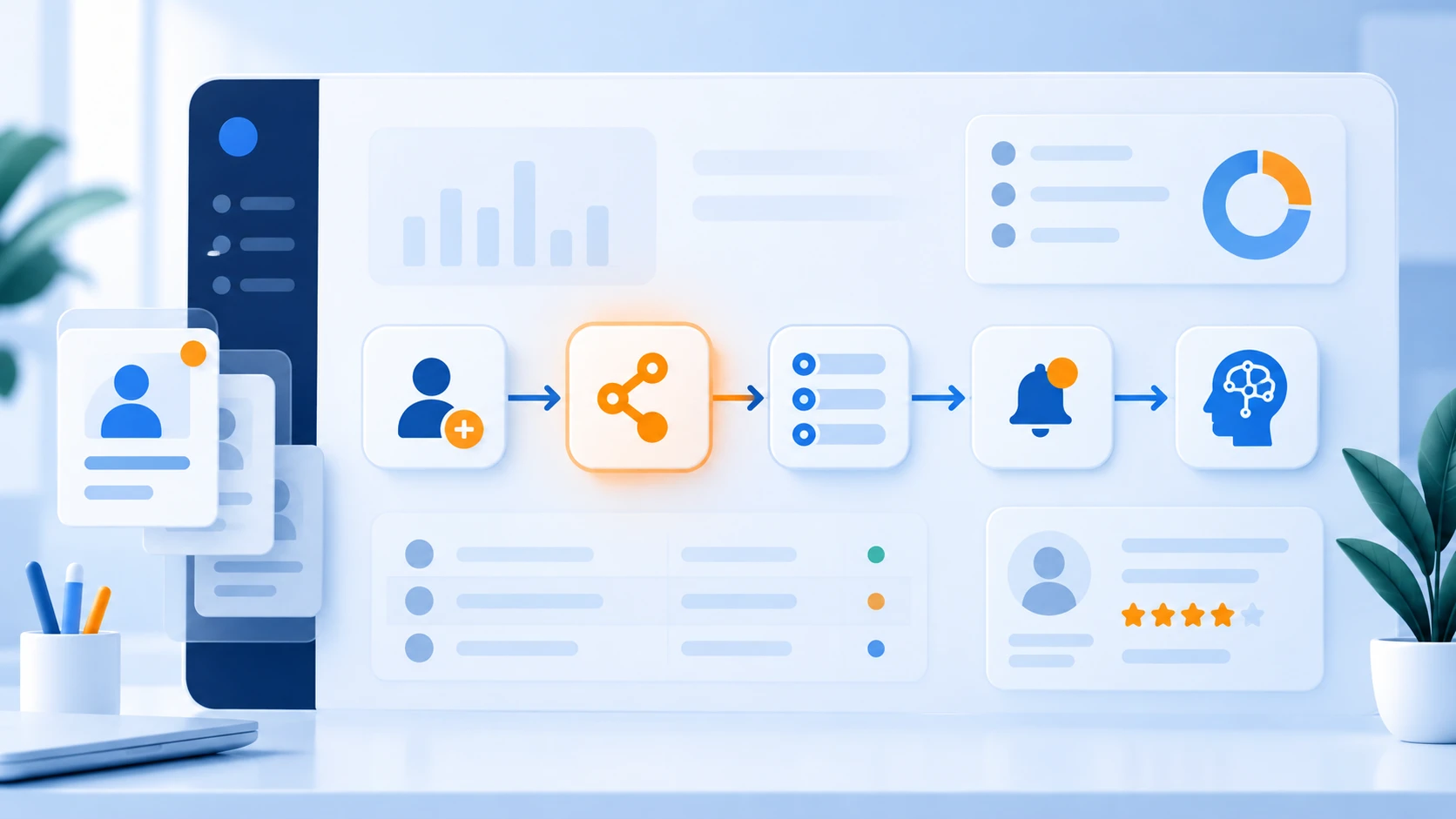
Workflow automation connects a trigger with one or more actions.
A trigger is the event that starts the flow. For example:
- Candidate Added
- Candidate Assigned to Job
- Candidate Talent Stage Updated
An action is what happens after that event. For example:
- Enroll the candidate into an ATZ CRM sequence
- Send a recruiter notification in Slack, Microsoft Teams, or email
- Ask AI to evaluate candidate-to-job fit
- Update candidate custom fields or add notes in ATZ CRM
The value is not only speed. It is consistency. Once the flow is live, the same process runs every time the event happens, so recruiters can focus on judgment, relationships, interviews, and client communication.
Use Case 1: Candidate Event to Sequence Enrollment
One of the most practical automations is also one of the simplest: when a candidate enters the CRM or reaches a specific hiring stage, add them to the right sequence automatically.
For example, a team may want to trigger a sequence when:
- A new candidate is added
- A candidate is assigned to a specific job
- A candidate moves into a screening, submitted, interview, or nurture stage
Instead of asking recruiters to manually remember which sequence to use, the workflow can enroll the candidate based on the event.
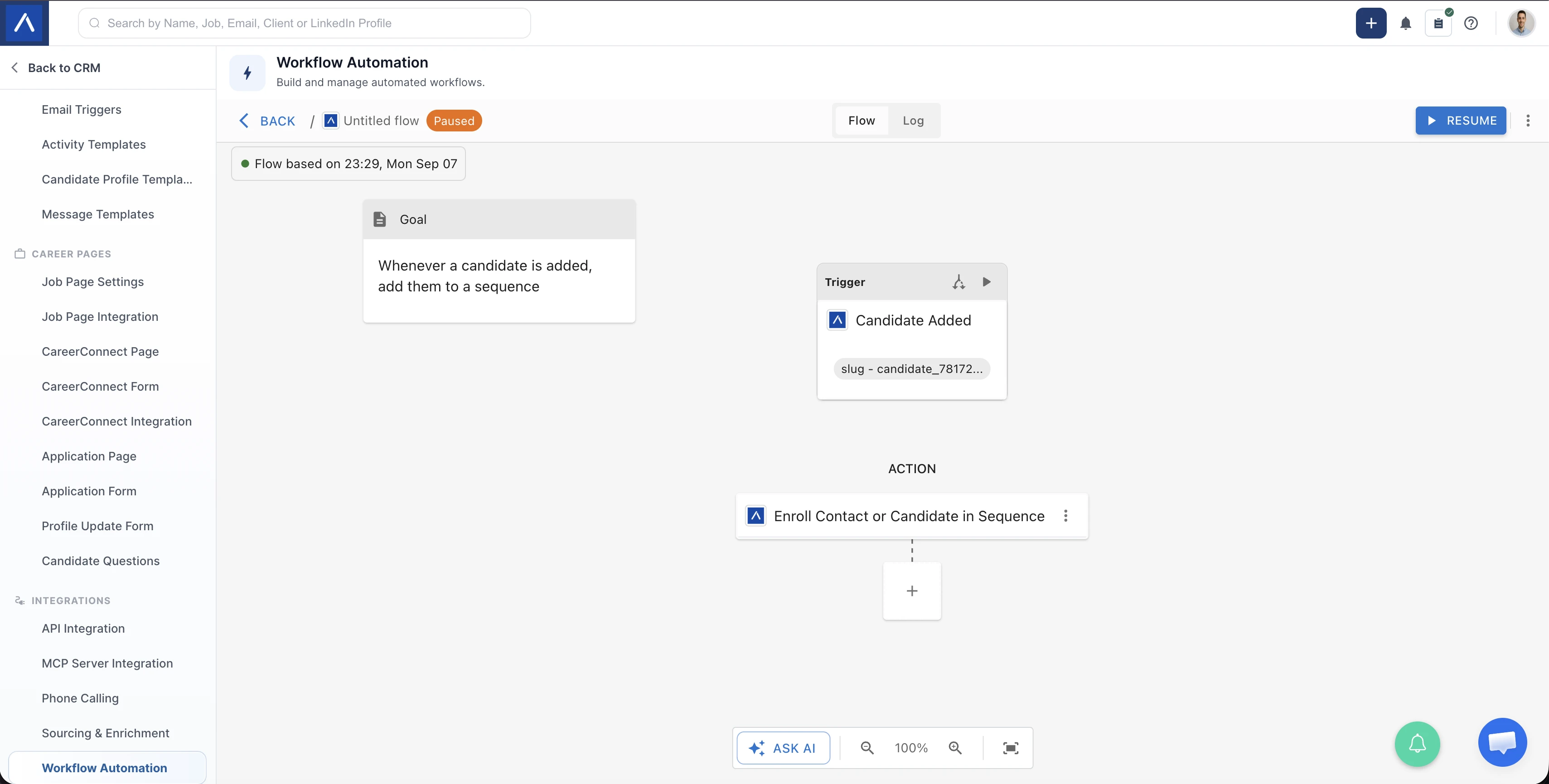
This is useful when candidate communication needs to happen quickly and consistently. A sourced candidate might need a warm introduction sequence. A newly applied candidate might need a confirmation and next-steps sequence. A candidate who has been moved into a nurture stage might need a long-term engagement campaign.
The workflow keeps the handoff clean: the recruiter updates the candidate or job stage, and ATZ CRM can handle the next communication step.
Why This Helps Recruiters
Manual follow-up is easy to miss when recruiters are balancing multiple jobs, candidates, hiring managers, and clients. Sequence automation helps teams:
- Respond to candidates faster
- Reduce missed follow-ups
- Keep communication consistent across recruiters
- Move candidates into the right nurture path
- Protect candidate experience during busy hiring periods
It is not about replacing recruiter communication. It is about making sure the first repeatable step happens every time, so recruiters can spend more time on the moments that need human attention.
Use Case 1B: Candidate Stage to Recruiter Notification
Sequences are one side of the workflow. Recruiter alerts are the other.
Some candidate events need immediate visibility. A recruiter may need to know when a candidate reaches a high-intent stage, when ownership changes, or when a candidate is assigned to a priority job. With workflow automation, those updates can be sent to the team channel or inbox where recruiters already work.
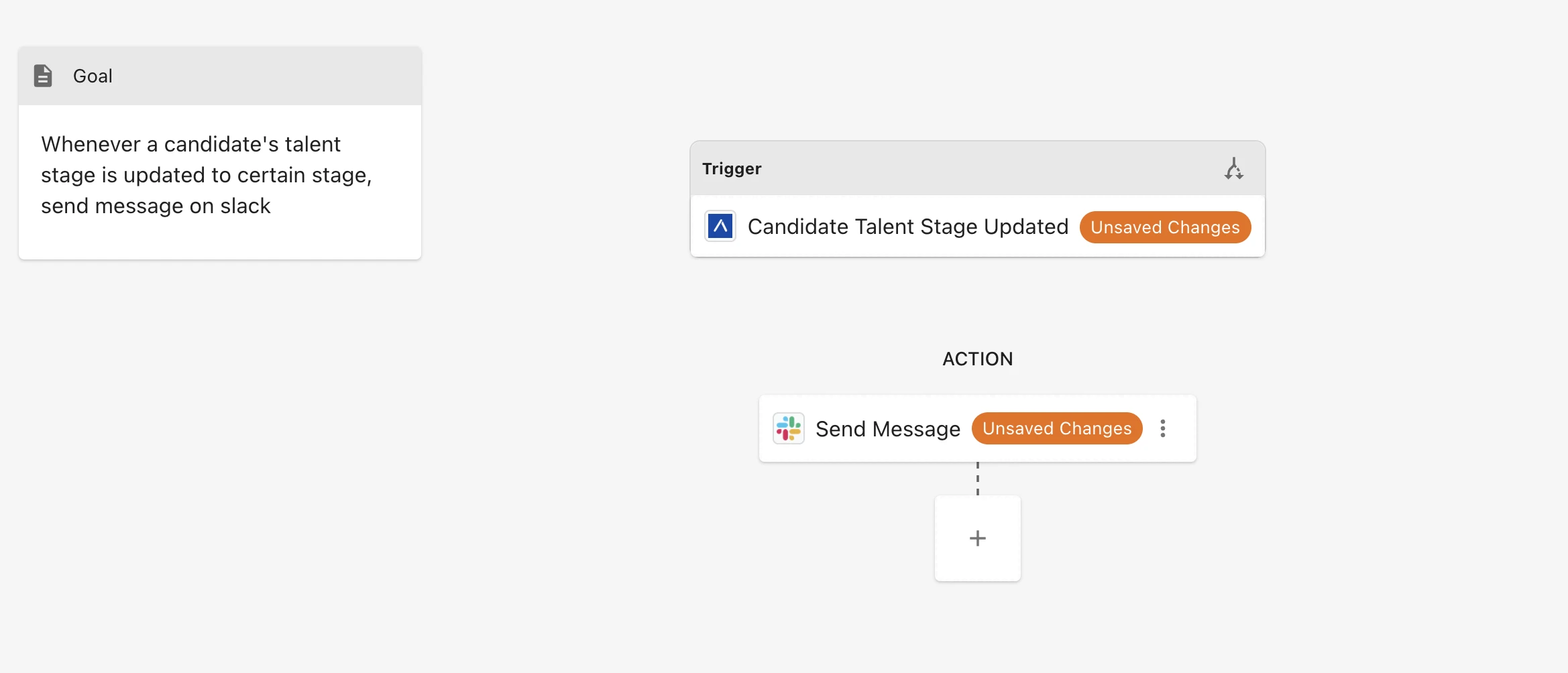
For example, a workflow can send a Slack message when a candidate’s talent stage is updated to a selected stage. The notification can include candidate details, job context, owner, stage, or any other mapped information available in the workflow.
This is especially helpful for teams that rely on fast internal coordination:
- Delivery teams can alert account managers when a strong candidate is ready.
- Recruiters can notify team leads when a candidate moves to interview.
- Sourcers can notify recruiters when a qualified candidate is assigned to a live role.
- Teams can route alerts to different Slack or Teams channels based on job, region, client, or stage.
The important part is that the alert is event-driven. Recruiters do not have to send a separate manual message after updating the CRM.
Use Case 2: Custom AI Candidate-to-Job Matching and Scoring
The second use case is more advanced: using workflow automation to create your own AI matching process.
When a candidate is assigned to a job, the workflow can send structured candidate and job data to an AI model such as ChatGPT, Claude, or another connected AI tool. The AI can evaluate the candidate against criteria defined by the recruiter or agency.
For example, a recruiter might ask the AI to score:
- Required skills match
- Relevant industry experience
- Seniority fit
- Location or work authorization fit
- Resume evidence quality
- Client-specific must-haves
- Potential gaps or concerns
The output can include a match score, strengths, gaps, and reasoning. Then the workflow can save that result back to the candidate profile in ATZ CRM.
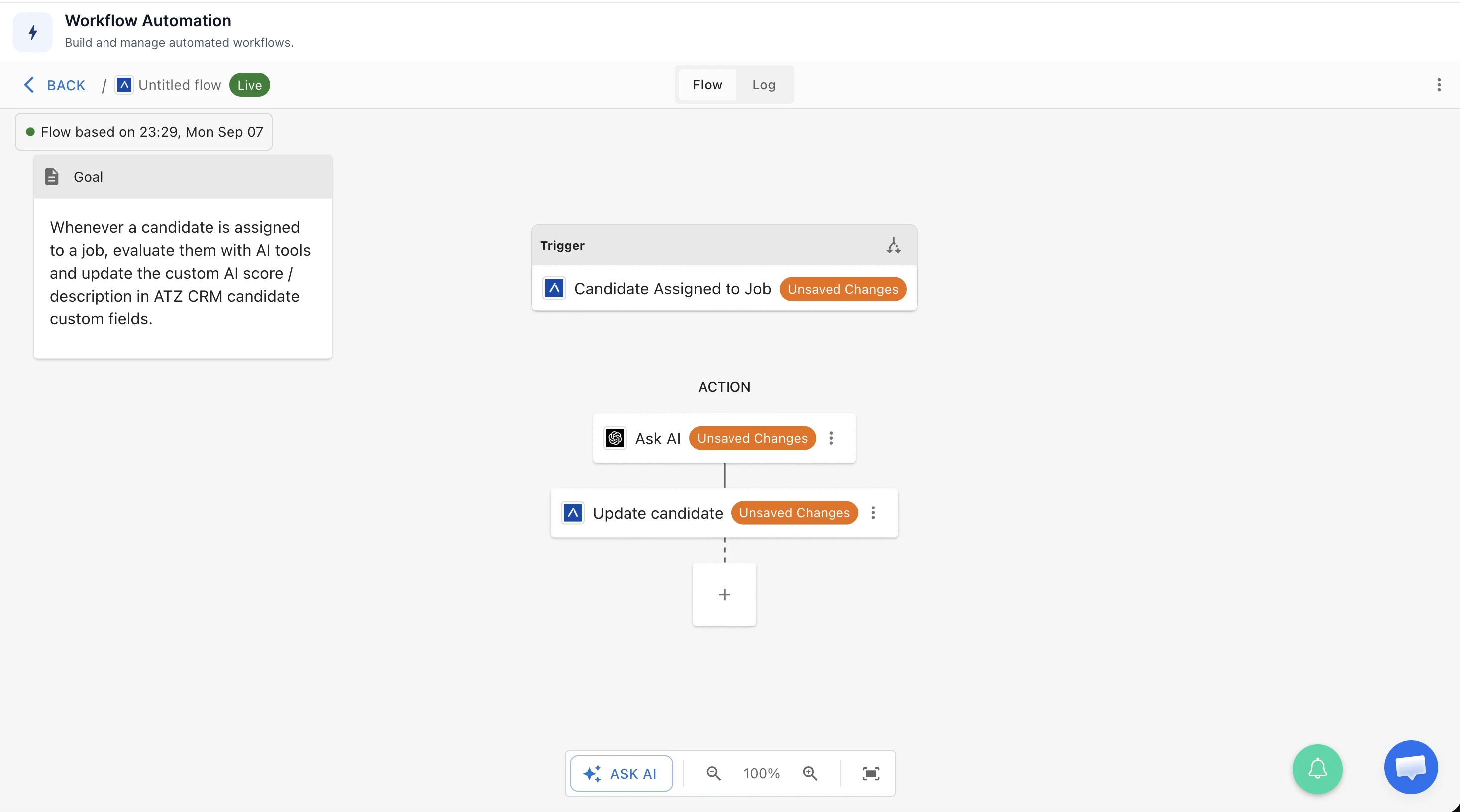
This creates a flexible evaluation layer. Recruiters are not limited to one universal scoring model. They can define the criteria that matter for a particular role, client, territory, or hiring process.
Example AI Scoring Output
A workflow could return structured scoring like this:
| Field | Example output |
|---|---|
| Match Score | 82/100 |
| Strengths | Strong React and TypeScript experience, relevant SaaS background, recent frontend ownership |
| Gaps | Limited enterprise accessibility experience, no clear evidence of GraphQL exposure |
| Reasoning | Candidate meets most core requirements and appears suitable for recruiter review, with two areas to validate during screening |
Once saved into ATZ CRM custom fields or notes, the score becomes part of the recruiter workflow. The team can filter, review, compare, or prioritize candidates with more context than a raw resume alone.
Why Custom AI Matching Matters
AI matching is most useful when it supports recruiter judgment instead of hiding it. Different jobs require different tradeoffs. A healthcare staffing role, a senior engineering role, and an executive search mandate should not all be scored by the same generic formula.
With a custom AI matching workflow, recruiters can decide what “good fit” means for each role.
For one job, the scoring criteria may prioritize certifications and location. For another, the prompt may prioritize leadership experience, niche domain knowledge, or past work with a specific tech stack. The workflow can reflect the actual hiring context instead of forcing recruiters to evaluate every candidate the same way.
The result is a more repeatable first-pass review:
- Recruiters get a faster summary of candidate-job fit.
- Hiring teams can standardize evaluation criteria for similar roles.
- Candidate notes become easier to scan.
- The CRM keeps the AI result attached to the candidate record.
- Recruiters still make the final decision.
What Recruiters Can Automate Next
These two examples are only starting points. Once events and actions are connected, recruiting teams can build workflows around many repeatable handoffs, such as:
- Add a candidate note when a key field changes
- Send interview-stage alerts to a team channel
- Update candidate fields after an AI enrichment step
- Trigger nurture sequences when candidates are archived or paused
- Send job or candidate data to a spreadsheet for reporting
- Notify account managers when a qualified candidate is submitted
- Create different workflows for permanent, contract, executive search, or staffing teams
The best workflows usually start with a small question: “What does the recruiter always do next after this event?”
If the answer is repeatable, it is a good candidate for automation.
How to Plan Your First Workflow
Before building a workflow, define the process in plain language:
- Choose the trigger. Decide what event should start the automation, such as Candidate Added, Candidate Assigned to Job, or Talent Stage Updated.
- Choose the action. Decide what should happen next, such as sequence enrollment, recruiter notification, AI scoring, or candidate update.
- Map the data. Confirm which candidate, job, resume, owner, stage, or custom field data the action needs.
- Test with demo records. Use sample candidates and jobs before turning the workflow live.
- Review the result. Check that the sequence, notification, AI output, or candidate update appears exactly where recruiters expect it.
Starting small is the fastest way to build trust. Once one flow works well, teams can expand from a single trigger-action workflow into richer multi-step automation.
Final Thoughts
Workflow automation in ATZ CRM gives recruiters a practical way to connect the moments that already happen in their CRM with the actions that should follow.
A candidate can be added to the right sequence. A recruiter can be alerted when a stage changes. A candidate assigned to a job can be evaluated by AI, scored against custom criteria, and updated inside the CRM for review.
That is the point of embedded automation: recruiters keep working from ATZ CRM, while routine steps run in the background.
Explore workflow automation in ATZ CRM or review the AI candidate matching feature to see how these workflows can support faster, more consistent hiring.
Frequently Asked Questions
What is workflow automation in ATZ CRM?
Workflow automation in ATZ CRM lets recruiters create flows that start from CRM events and run follow-up actions automatically. For example, a candidate can be added to a sequence, a recruiter can receive a Slack notification, or a candidate record can be updated after an AI step.
Which candidate events can trigger workflows?
Common candidate workflow triggers include Candidate Added, Candidate Assigned to Job, and Candidate Talent Stage Updated. Teams can use these events to automate communication, alerts, candidate updates, and AI evaluation steps.
Can ATZ CRM workflow automation connect with Slack or Microsoft Teams?
Yes. Recruiter notifications can be sent to collaboration tools such as Slack or Microsoft Teams, as well as email, depending on how the workflow is configured.
Can AI scores be saved back into ATZ CRM?
Yes. A workflow can send candidate and job details to an AI model, receive a score and reasoning, then update ATZ CRM custom fields or notes so recruiters can review the result inside the candidate record.
Should recruiters rely only on AI scores?
No. AI scoring should support recruiter review, not replace it. The best use is to create a consistent first-pass evaluation that recruiters can inspect, validate, and adjust based on real hiring context.
Is ATZ CRM workflow automation connected with viaSocket?
Yes. ATZ CRM workflow automation uses viaSocket behind the embedded automation experience, so recruiters can create workflows inside ATZ CRM while still connecting to supported external apps.