EN
EN DE
DE ES
ES FR
FR NL
NL PT
PT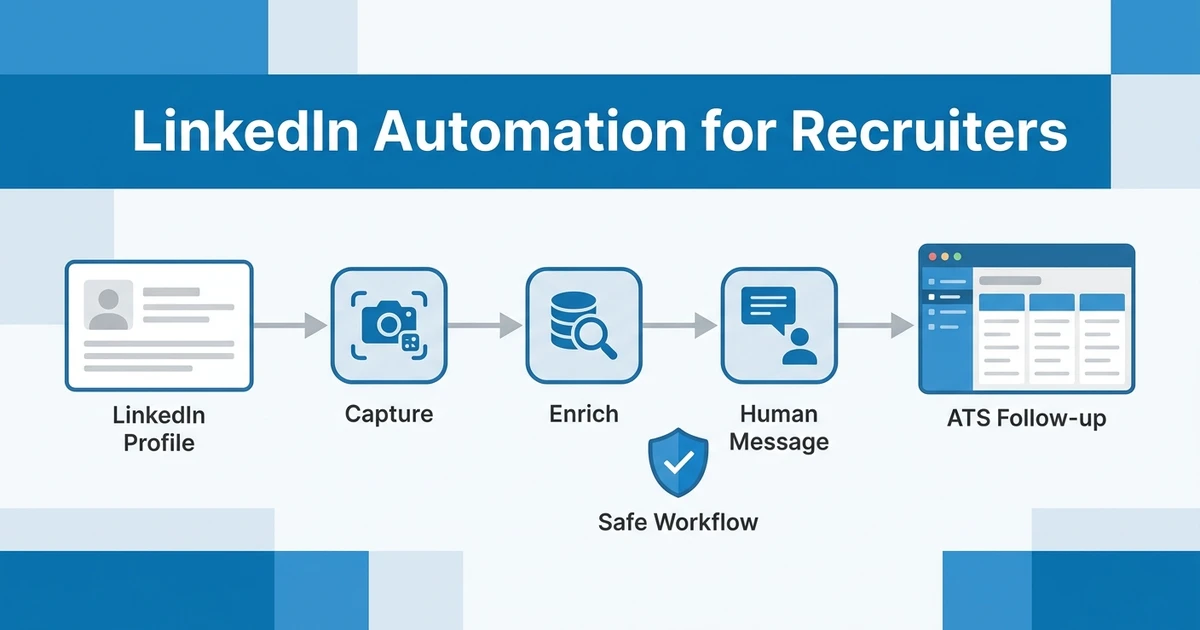





Quick Answer: LinkedIn automation for recruiters should automate sourcing admin, not recruiter judgment. The safest workflow is to capture profiles, prevent duplicates, enrich records, and track follow-ups in your ATS while keeping candidate outreach personal and compliant.
LinkedIn is still one of the most important sourcing channels for agency recruiters. It is also one of the easiest places to damage candidate trust if you treat people like a cold sales list.
The right approach is practical. Use automation to reduce copy-paste work, enrich candidate records, and keep follow-ups organized. Keep the relationship human.
Why Recruiters Need a Safer Approach to LinkedIn Automation
Most LinkedIn automation advice is written for sales teams. That creates a problem for recruiters because candidate outreach has a different trust dynamic.
You are not just trying to book a meeting. You are asking someone to consider a career move, share private information, and trust your judgment with their profile.
Generic Sales Automation Creates Candidate Trust Problems
Candidates can spot automated outreach quickly. A message that ignores their current role, location, career history, or likely motivation feels careless.
That hurts your brand. It also weakens response rates because strong candidates already receive enough low-effort outreach.
Copy-Paste Sourcing Wastes Hours Every Week
The answer is not to avoid automation completely. Manual profile capture, spreadsheet updates, and repeated follow-up reminders waste time that recruiters could spend on conversations.
LinkedIn’s 2026 talent research found that 93% of recruiters plan to increase AI use in 2026, and 59% say AI already helps them discover candidates with skills they would not have found before according to LinkedIn’s 2026 research. That makes workflow quality more important, not less.
Standalone Automation Tools Lose Context Outside the ATS
A standalone tool may send messages or capture profiles, but it often sits outside your core recruitment system. That creates a second database.
When notes, replies, and enrichment data do not sync back to the ATS, recruiters lose context. The next consultant may source the same person again or miss a warm follow-up.
What LinkedIn Automation for Recruiters Should Actually Do
LinkedIn automation for recruiters should focus on low-risk workflow tasks: saving profiles, checking duplicates, enriching records, setting reminders, and organizing follow-up. Those tasks help recruiters move faster without pretending a mass message is personal.
The best workflows also support better judgment. They bring profile data into the ATS, connect the candidate to the right job or hotlist, and give the recruiter enough context to write a relevant message.
Safe automation helps with:
- Profile capture from LinkedIn into your ATS.
- Duplicate detection against your candidate database.
- Verified contact enrichment where lawful and appropriate.
- Follow-up reminders and sequence organization.
- Communication history across LinkedIn, email, phone, and WhatsApp.
- Reporting on source quality and conversion.
Unsafe automation tries to replace the relationship. If a tool pushes you toward high-volume generic connection requests or messages that look personal but are not, it is solving the wrong problem.
What Recruiters Should Not Automate on LinkedIn
Recruiters should not automate actions that create platform risk or candidate trust risk. The line is simple: automate admin, not fake intimacy.
LinkedIn’s official user agreement prohibits using bots, scraping, and other unauthorized automated methods to access the services in its platform terms. That should shape how your team evaluates every tool.
Avoid these workflows:
- Mass connection requests to broad search lists.
- Generic pitch sequences that ignore the candidate’s profile.
- Scraping workflows that bypass platform rules or consent expectations.
- Automated messages written to look manually researched.
- Follow-up loops that continue after a candidate has declined.
This does not mean recruiters must do everything manually. It means the automation should make your work more accurate and organized, not more spammy.
LinkedIn Automation Tools vs ATS LinkedIn Integration
The big decision is whether you need a standalone automation tool or an ATS-connected LinkedIn workflow. For agencies, the ATS-connected approach is usually stronger because sourcing only matters if it improves pipeline movement.
Use this table to compare the options:
| Approach | Best for | Main benefit | Risk | Recruiter fit |
|---|---|---|---|---|
| Standalone LinkedIn automation tool | High-volume outbound tests | Fast message and connection workflows | Account and brand risk if used aggressively | Limited for relationship-led recruiting |
| LinkedIn profile importer | Capturing candidate profiles | Reduces copy-paste data entry | Can create duplicates without ATS checks | Useful for sourcers |
| Enrichment tool | Finding verified contact details | Adds email or phone data | Needs careful compliance handling | Useful after qualification |
| Outreach sequencer | Follow-up organization | Keeps reminders and templates structured | Can become generic if overused | Useful with personalization |
| ATS LinkedIn integration | Connected sourcing | Keeps profiles tied to jobs and candidates | Depends on data hygiene | Strong fit for agencies |
| Unified ATS and CRM workflow | End-to-end recruiting | Connects sourcing, outreach, pipeline, and clients | Requires team adoption | Best fit for scaling agencies |
Standalone tools are not always bad. They can be useful for specific sourcing motions, especially when recruiters understand the limits.
The problem starts when the automation layer becomes disconnected from your candidate database. If your team cannot see who sourced the candidate, which role they were considered for, what they replied, and whether they are already in another pipeline, the workflow is incomplete.
The Safe LinkedIn Recruiting Automation Workflow
A safer workflow starts with recruiter intent, not bulk automation. Your team identifies the right people, then uses tools to remove repetitive admin around that decision.
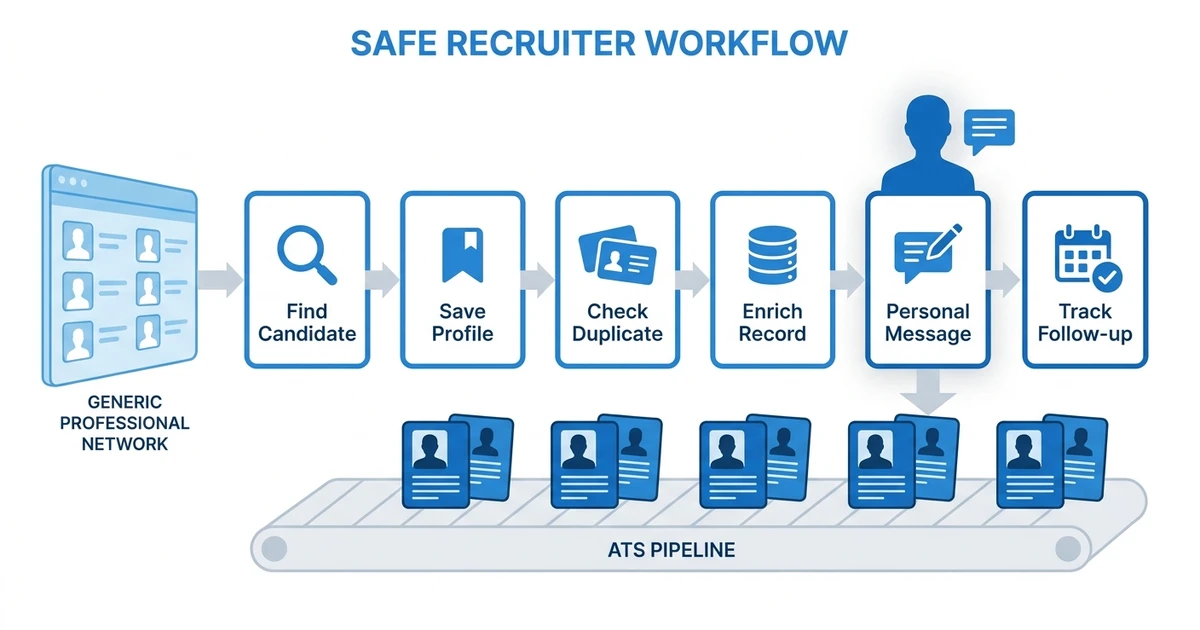
Here is the workflow to build:
- Identify candidates manually or with search alerts.
- Save profiles with a Chrome extension or ATS integration.
- Deduplicate against the candidate database.
- Enrich verified contact details where lawful and appropriate.
- Write a personalized first message.
- Track replies and follow-ups in the ATS and CRM.
- Move qualified candidates into the right pipeline stage or hotlist.
This workflow keeps recruiters in control of candidate judgment. The tool handles repeatable steps, while the recruiter handles relevance, timing, role fit, and tone.
It also reduces internal confusion. If one recruiter has already contacted a candidate, the rest of the team can see that history before starting another conversation.
How to Choose the Best LinkedIn Automation Tools for Recruiters
The best LinkedIn automation tools for recruiters are not always the tools with the most sending volume. The better question is whether the tool protects candidate trust and improves your recruiting data.
Evaluate each option through these criteria:
Safety and Compliance Controls
Look for clear controls around activity limits, data handling, and consent. Avoid tools that encourage workarounds or hide how data is collected.
For recruitment agencies, compliance is not only legal risk. It is brand risk with candidates and clients.
ATS Sync and Duplicate Prevention
Your LinkedIn workflow should connect to your ATS. Otherwise, every sourced candidate becomes another manual update.
The most useful tools check whether a candidate already exists, add the profile to the right job or hotlist, and keep notes attached to the record.
Personalization Support, Not Message Blasting
Templates can help, but they should not remove thought. Good tools give recruiters context and drafts that can be edited.
Poor tools optimize for volume. That may look efficient in the short term, but it weakens the candidate experience.
Multi-Channel Follow-Up
LinkedIn is one channel. Agency recruiters also use email, phone, SMS, and WhatsApp depending on the market and candidate preference.
Your workflow should show the full conversation history. That avoids awkward duplicate outreach and makes handoffs cleaner.
Reporting on Replies, Source Quality, and Placements
Recruiters need to know which sourcing channels create real pipeline, not just activity. Reporting should connect LinkedIn sourcing to replies, interviews, submissions, and placements.
Bullhorn’s 2026 GRID report found that top-performing agencies are focused on AI, faster placements, and productivity, with 56% of respondents reporting revenue growth in its 2026 recruitment industry report. That is the level of workflow impact your tools should support.
How ATZ CRM Connects LinkedIn Sourcing to Recruiter Follow-Up
ATZ CRM is built for recruiters who want LinkedIn sourcing connected to the rest of the desk. The LinkedIn sourcing Chrome extension helps you capture profiles directly into the CRM instead of copying details into a spreadsheet.
From there, your team can use verified candidate data enrichment to complete the record, then track outreach and follow-ups through the candidate timeline.
ATZ CRM also supports LinkedIn integration for recruiters, LinkedIn Recruiter integration, and LinkedIn messaging for recruiters. That keeps sourced candidates connected to jobs, clients, communication history, and pipeline movement.
The goal is not to automate every message. The goal is to stop losing context between search, outreach, enrichment, and follow-up.
Want LinkedIn sourcing without spreadsheet cleanup or disconnected outreach tools? Use ATZ CRM’s Chrome Extension and LinkedIn integrations to capture profiles, enrich records, and manage follow-up from one ATS and CRM workflow.
Frequently Asked Questions
What is LinkedIn automation for recruiters?
This workflow uses tools to reduce manual sourcing admin, such as profile capture, deduplication, enrichment, reminders, and follow-up tracking. It should support human outreach, not replace recruiter judgment or send generic messages at scale.
Is LinkedIn automation safe for recruiters?
It is safer when it focuses on workflow organization rather than aggressive mass actions. Recruiters should respect LinkedIn’s terms, avoid scraping behavior that creates account risk, and keep candidate communication personal.
What is the best LinkedIn automation tool for recruiters?
The best tool depends on the workflow. For agency recruiters, an ATS-connected setup is usually stronger than a standalone automation tool because it keeps profiles, notes, enrichment, replies, and follow-ups in one candidate record.
How does ATS LinkedIn integration help recruiters?
ATS LinkedIn integration helps recruiters save profiles, prevent duplicates, enrich candidate records, and track follow-up without copy-pasting between systems. It keeps sourcing activity connected to jobs, clients, and candidate pipelines.
Should recruiters automate LinkedIn outreach?
Recruiters should be careful with LinkedIn outreach automation. Automate reminders, templates, profile capture, and tracking, but keep first messages and important follow-ups personalized to the candidate’s background and the role.
Conclusion: Automate the Admin, Keep the Relationship Human
LinkedIn automation works best when it protects the recruiter-candidate relationship. Automate the admin around sourcing, but keep the message thoughtful and relevant.
If your current LinkedIn workflow lives across tabs, spreadsheets, and disconnected tools, ATZ CRM gives you a cleaner path. Pair the candidate sourcing guide with ATZ CRM’s LinkedIn integrations to build a sourcing workflow that captures profiles, enriches records, and keeps follow-up tied to your ATS and CRM.