EN
EN DE
DE ES
ES FR
FR NL
NL PT
PT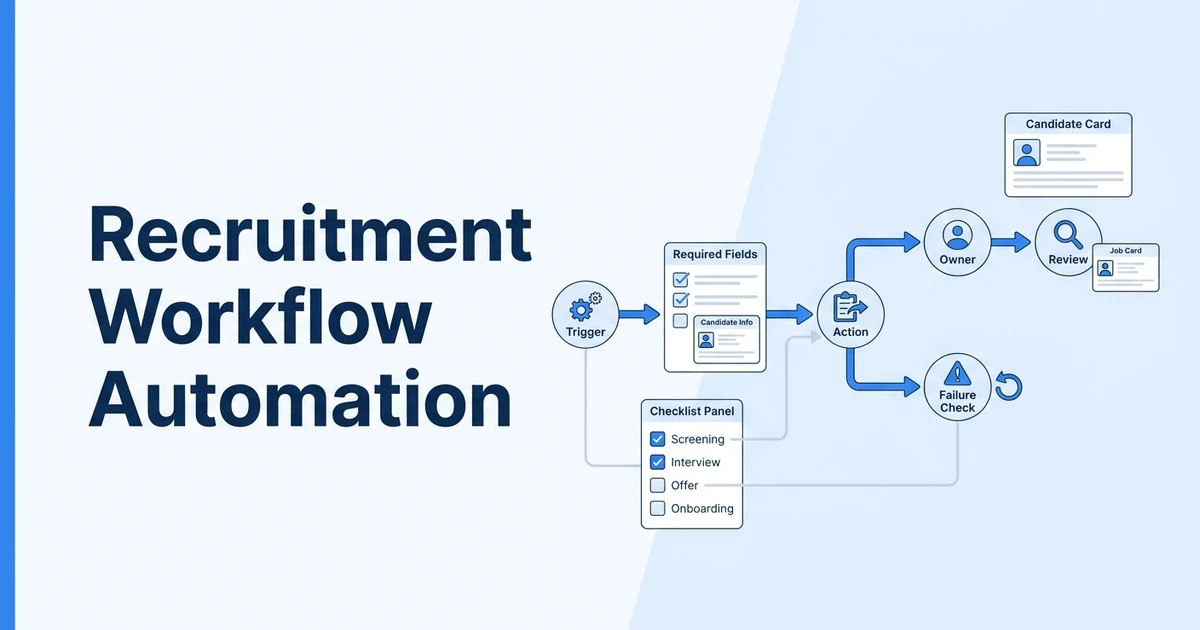





Quick Answer: Recruitment workflow automation examples work best when they are built as small operating recipes, not vague ideas. Define the trigger, required data, action, owner, review point, and failure condition for each workflow before you turn it on.
Most articles about workflow automation list ideas. That is useful for brainstorming, but it is not enough for a recruiting desk that has to run live jobs, client handoffs, candidate follow-ups, and manager reporting without creating confusion.
This guide is different. It treats each recruitment workflow automation as a recipe your agency can inspect before building it in ATZ CRM.
ATZ CRM can run these patterns inside the same workspace recruiters use for candidates, jobs, clients, notes, sequences, AI review, and reporting. That is the point of using recruitment-specific workflow automation: the trigger, action, owner, and outcome stay attached to the recruiting record instead of living in a separate automation layer.
If you need the product-level overview first, read the workflow automation in ATZ CRM guide. This article assumes you already understand the basic trigger-action model and want cleaner examples your team can actually roll out.
How to Use These Recruitment Workflow Automation Examples
Each workflow below includes five practical parts:
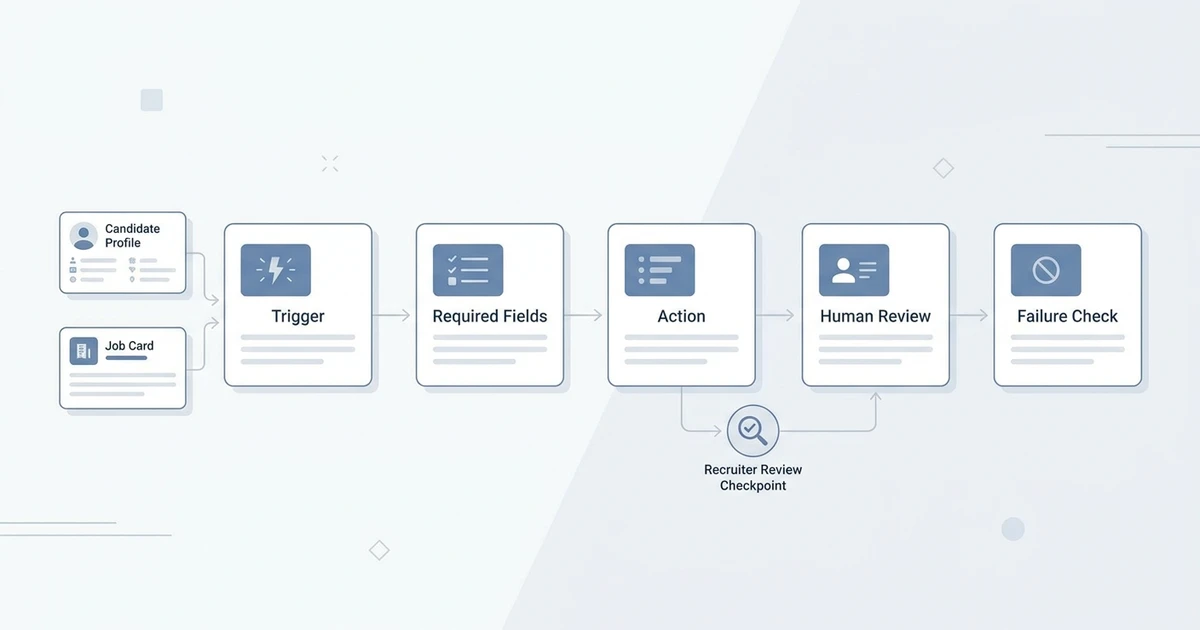
| Part | What to decide |
|---|---|
| Trigger | The event that starts the workflow |
| Required fields | The data the workflow needs before it runs |
| Action | The message, task, alert, update, note, or AI step created |
| Human review | The person who checks the result or owns the next decision |
| Failure check | The sign that the workflow is too broad, too noisy, or unsafe |
That structure matters because automation failures usually do not come from the tool. They come from unclear ownership, weak field mapping, or workflows that fire when the team does not expect them.
LinkedIn’s Future of Recruiting coverage says AI and automation can elevate recruiters when they support higher-value work, not just faster activity LinkedIn Future of Recruiting report. SHRM’s 2025 Talent Trends research shows AI adoption in HR tasks rose to 43% in 2025 from 26% in 2024 SHRM 2025 Talent Trends research.
The lesson for agencies is straightforward: automate the repeatable handoff, but keep recruiter judgment visible.
Recipe 1: New Candidate Intake to First Response
Trigger: Candidate record created.
Required fields: Candidate name, email, source, owner, consent status, and candidate type.
Action: Enroll the candidate into the correct first-response sequence or create a recruiter task if consent or source context is missing.
This workflow protects the first touch. A sourced candidate, inbound applicant, referral, and imported database record should not all receive the same message.
Use branching rules when possible:
- Applicant receives confirmation and next-step expectations.
- Sourced candidate receives a recruiter-reviewed introduction.
- Referral receives a warmer message that references the referral source.
- Imported candidate gets a profile update request before outreach starts.
Human review: Candidate owner checks replies and updates the record after the first meaningful interaction.
Failure check: Pause the workflow if candidates receive messages before consent, source, or role context is clear.
Recipe 2: Candidate Assigned to Job to Owner Alert
Trigger: Candidate assigned to a job.
Required fields: Candidate owner, job owner, job title, client, priority, and candidate stage.
Action: Send a targeted alert to the owner with a link to the candidate and job record.
This workflow is useful when sourcing and delivery are split across the team. It keeps the job owner from missing candidates that were added by another recruiter.
The alert should not say “candidate updated.” It should tell the owner what changed and what to review next.
Good alert format:
| Field | Example |
|---|---|
| Event | Candidate assigned to job |
| Candidate | Candidate name and profile link |
| Job | Job title, client, and priority |
| Next step | Review for shortlist or screening |
| Owner | Recruiter responsible for action |
Human review: Job owner reviews the candidate before outreach, submission, or rejection.
Failure check: If the team ignores the alert channel, route only priority jobs or same-day review jobs.
Recipe 3: Missing Job Intake Data to Follow-Up Task
Trigger: New job created or job status changed to active.
Required fields: Job title, client, salary range, location, work model, must-have skills, interview process, and submission expectations.
Action: Create a task for the account manager or recruiter when critical intake fields are missing.
This workflow is a quality guardrail. It prevents recruiters from starting search work with incomplete requirements.
Weak job intake creates weak search, weak AI matching, and weak submissions. Automation should catch the missing context before the team wastes hours on candidates who never had a real chance.
Human review: Account manager confirms the missing fields with the client or hiring manager.
Failure check: If the task fires for nearly every job, the intake form is probably too heavy or unclear.
Recipe 4: Candidate Stage Change to Candidate Update
Trigger: Candidate moves into a selected stage.
Required fields: Candidate name, stage, job, recruiter, message template, and communication preference.
Action: Send a stage-appropriate update or create a task for the recruiter to send one manually.
This workflow should be selective. Screening, submitted, interview, offer, rejected, and nurture stages usually deserve communication. Minor internal stages may not.
Use candidate-facing automation only when the message is true and safe to send.
| Stage | Useful action |
|---|---|
| Screening | Confirm review is in progress |
| Submitted | Explain that the profile has moved forward when appropriate |
| Interview | Send preparation and logistics |
| Rejected | Send respectful closure or nurture message |
| Nurture | Ask for updated preferences |
Human review: Recruiter reviews sensitive messages before they go out.
Failure check: If candidates receive vague updates that do not match the real stage, switch from auto-send to recruiter task creation.
Recipe 5: Interview Stage to Reminder and Recruiter Task
Trigger: Candidate moved to interview stage or interview date added.
Required fields: Interview date, time zone, meeting link or location, interviewer, candidate email, and recruiter owner.
Action: Send candidate reminders and create a recruiter task to confirm logistics.
Interview coordination is repetitive, but it is also sensitive. A reminder with the wrong time zone or stale meeting link hurts trust immediately.
Build the workflow so missing logistics stop the candidate message and create an internal task instead.
Human review: Recruiter or coordinator confirms interview details before the first reminder runs.
Failure check: If reminders go out without the final client confirmation, add a required “interview confirmed” field.
Recipe 6: No Response to Follow-Up Sequence
Trigger: No candidate reply after a defined delay.
Required fields: Last outreach date, candidate stage, job context, sequence type, and opt-out status.
Action: Send one or two useful follow-ups or create a recruiter task for manual follow-up.
The follow-up should add context. A repeated “checking in” message is not enough.
Useful follow-up angles:
- Clarify why the role may fit.
- Share one practical job detail.
- Offer a simple yes or no reply path.
- Ask whether future roles would be better.
- Give the candidate an easy way to opt out.
Human review: Recruiter reviews reply quality and pauses sequences that create negative responses.
Failure check: If the workflow sends more messages than a recruiter would send manually, shorten it.
Recipe 7: Candidate Assigned to Job to AI Review Draft
Trigger: Candidate assigned to a job.
Required fields: Resume, candidate profile, job description, must-have criteria, location, work authorization, and recruiter owner.
Action: Ask AI for a structured first-pass review, then save the output to a note or custom field.
This is where workflow automation can support recruiter judgment without hiding it.
Ask for structured output:
| Output | Why it helps |
|---|---|
| Match summary | Helps recruiters scan fit quickly |
| Evidence | Shows which resume details support the score |
| Gaps | Tells the recruiter what to validate |
| Screening questions | Turns uncertainty into the next call |
| Recruiter note | Keeps the reasoning inside the CRM |
ATZ CRM teams can pair this with AI candidate matching and workflow automation so AI output stays attached to the candidate workflow.
That is especially useful for agencies using ATZ CRM’s AI candidate summaries, AI matching, and similar candidate search together. A recruiter can use AI to prepare the review, then keep the score, evidence, gaps, and next action visible inside the candidate record.
Human review: Recruiter validates the score and reasoning before using it for action.
Failure check: If AI output contains invented facts, lower the prompt scope and require quoted resume evidence.
Recipe 8: Client Submission to Feedback Reminder
Trigger: Candidate moved to submitted stage.
Required fields: Candidate, job, client, account manager, submission date, and feedback due date.
Action: Create a feedback reminder for the account manager if no response is logged by the due date.
This workflow protects momentum. Candidate interest fades when the client feedback loop goes quiet.
American Staffing Association guidance frames staffing performance as a chain where candidate conversations lead to submissions, submissions lead to interviews, interviews lead to starts, and starts create gross profit American Staffing Association KPI guidance. Client feedback is one of the links in that chain.
Human review: Account manager decides how and when to follow up with the client.
Failure check: If reminders fire during agreed review windows, add client-specific timing rules.
Recipe 9: Rejected Candidate to Nurture Decision
Trigger: Candidate moved to rejected, not selected, or future-fit stage.
Required fields: Rejection reason, job, candidate owner, communication status, and future-fit tag.
Action: Create a decision branch: send closure, enroll in nurture, or create a recruiter review task.
Do not treat every rejected candidate the same. A candidate rejected because of location, salary, timing, missing certification, or client preference may need a different next step.
Use this workflow to protect candidate relationships without creating false expectations.
Human review: Recruiter confirms whether the candidate should receive closure, future role nurture, or no automated message.
Failure check: If candidates receive vague “we will keep you in mind” messages with no real tagging plan, rewrite the workflow.
Recipe 10: Stale Candidate Record to Rediscovery Review
Trigger: Candidate has no activity for a defined period and matches an active skill, role, or location tag.
Required fields: Last contacted date, skill tags, location, role preference, availability, and consent status.
Action: Create a recruiter review task or add the candidate to a reactivation shortlist.
Rediscovery should be targeted. Do not wake the whole database just because records are old.
This workflow works best when candidate records have clean skills, source, notes, and past submission history. Weak data creates weak rediscovery.
Human review: Recruiter checks current relevance before outreach.
Failure check: If too many stale records appear, tighten the skill, location, stage, or source filter.
Recipe 11: Placement to Post-Placement Follow-Up
Trigger: Candidate moved to placed, start date added, or deal marked won.
Required fields: Candidate, client, start date, placement owner, fee or revenue field, and follow-up cadence.
Action: Create follow-up tasks for candidate check-ins, client satisfaction checks, and revenue reporting.
Placement is not the end of the agency workflow. It is the start of retention, redeployment, referral, and client expansion work.
Use this workflow to make the post-placement process visible instead of leaving it to memory.
Human review: Recruiter and account manager confirm check-in notes after each follow-up.
Failure check: If tasks pile up after placements, reduce the cadence and assign one accountable owner.
Recipe 12: Stage Movement to Reporting Update
Trigger: Candidate, job, submission, interview, offer, or placement stage changes.
Required fields: Source, owner, client, job, stage, date, and outcome.
Action: Update dashboard fields, create a report entry, or sync selected values to a reporting view.
Reporting workflows should not create a second system of record. The CRM should remain the place where recruiters update the truth.
Use reporting automation to reduce manual cleanup, not to hide messy data.
Human review: Operations or leadership reviews field quality weekly.
Failure check: If reports look inconsistent, fix stage definitions and required fields before adding more automation.
Rollout Plan for Agency Teams
Start with one workflow per team, not one workflow per idea.
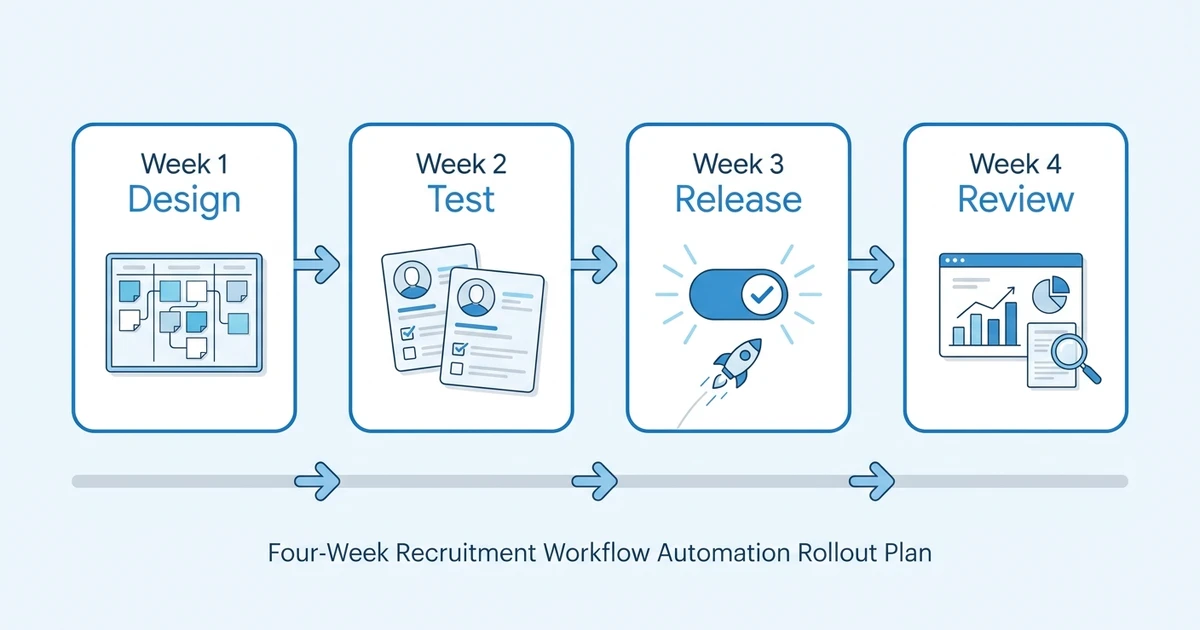
Week one should be about design. Pick the workflow, write the trigger-action sentence, list required fields, and decide who owns the result.
Week two should be about testing. Use demo candidates and jobs. Check the sequence, note, alert, field update, and task output before any live records run.
Week three should be about controlled release. Turn the workflow on for one team, one job type, or one pipeline.
Week four should be about review. Keep the workflow if it saves time and improves visibility. Narrow it if it creates noise. Pause it if recruiters do not trust the output.
Want these recipes to run inside the same system where recruiters already manage jobs and candidates? Explore ATZ CRM workflow automation and connect triggers, actions, notifications, and AI review without pushing recruiters into another tracker.
Workflow Naming Conventions
Names matter because agencies eventually have many workflows.
Use a naming pattern your team can scan:
Trigger > Condition > Action > Owner
Examples:
- Candidate Added > Applicant Source > Welcome Sequence > Candidate Owner
- Candidate Assigned > Priority Job > Slack Alert > Job Owner
- Interview Date Added > Confirmed > Reminder Sequence > Candidate Owner
- Submitted Stage > No Feedback > Account Manager Task > Client Owner
- Placement Created > Start Date Set > Post-Placement Tasks > Recruiter
Avoid names like “Automation 3” or “New Flow.” Nobody will remember what those mean during a busy week.
When Not to Automate
Do not automate a step just because it repeats.
Avoid automation when:
- The rule has too many exceptions.
- The message depends on sensitive client context.
- The data is often incomplete.
- The output cannot be inspected.
- The team disagrees about the correct next action.
- The workflow creates more alerts than decisions.
Automation should make the next action clearer. If it makes the process harder to understand, the workflow is not ready.
Frequently Asked Questions
What are recruitment workflow automation examples?
Recruitment workflow automation examples are practical trigger-action recipes for common recruiting handoffs. They can enroll candidates into sequences, notify recruiters, create client feedback tasks, run AI review, update records, or support reporting.
Which recruitment workflow should I automate first?
Start with a workflow that is frequent, low risk, and easy to verify. Candidate first-response sequences, owner alerts, interview reminders, and feedback reminders are usually better first workflows than complex multi-step AI automations.
Can ATZ CRM automate AI candidate scoring?
Yes. ATZ CRM workflows can support AI candidate review by sending candidate and job context to an AI step and saving the result back to the candidate record. Recruiters should still review the score and reasoning before taking action.
How do I stop workflow automation from creating noise?
Limit each workflow to a clear event and a specific owner. Review alert volume weekly, pause ignored workflows, and avoid sending team-wide messages for updates that only one recruiter needs.
Should candidate-facing messages be fully automated?
Some candidate-facing messages can be automated, such as confirmations, reminders, and nurture touches. Sensitive messages, rejection details, offer conversations, and client-specific updates should usually require recruiter review.
Final Thoughts
Recruitment workflow automation is most useful when the team can see exactly what happened and why.
Start with small recipes. Define the trigger, required fields, action, owner, review step, and failure check. Then build only the workflows that save recruiters time without hiding judgment.
For a practical product walkthrough, review workflow automation in ATZ CRM or explore the ATZ CRM recruitment CRM to see how candidate, client, job, and reporting data can stay connected.