EN
EN DE
DE ES
ES FR
FR NL
NL PT
PT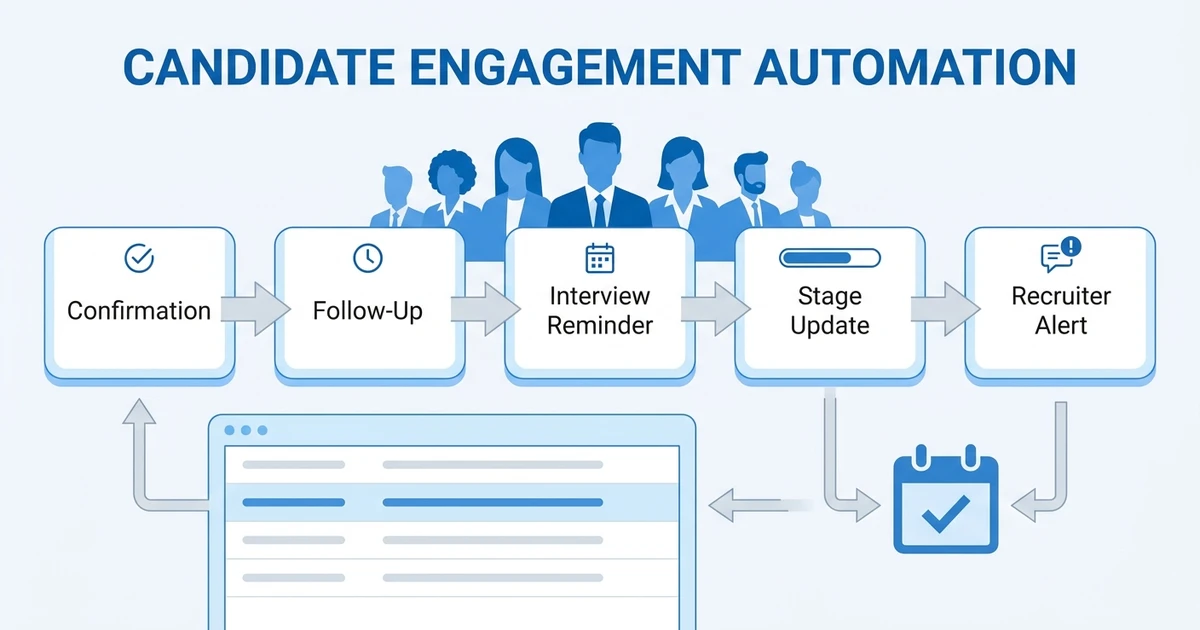





Quick Answer: Candidate engagement automation works when it improves timing without making the relationship feel automated. Use it for confirmations, reminders, follow-ups, stage updates, reactivation, and recruiter alerts, but keep recruiters in control of judgment-heavy messages.
Candidate engagement breaks down when communication depends only on memory. Recruiters intend to follow up, but live jobs, passive candidates, client feedback, interviews, submissions, and manager requests compete for attention all day.
Automation helps by protecting the moments candidates notice most: the first response, the interview reminder, the status update, the follow-up after silence, and the respectful close.
iHire’s 2025 ghosting research found that 53% of surveyed candidates said they had been ghosted by an employer during a job search iHire candidate ghosting survey. SHRM also reported that 41% of organizations were seeing candidates ghosting during hiring efforts SHRM candidate ghosting coverage.
That is the real job of candidate engagement automation: reduce silence on both sides.
ATZ CRM helps recruiters handle that inside the same recruiting CRM where candidate records, stages, sequences, alerts, and recruiter tasks already live. Teams can use workflow automation, email campaigns for recruiters, and CRM updates together so follow-ups stay tied to the candidate record instead of getting buried in inbox memory.
What Candidate Engagement Automation Should Protect
Candidate engagement automation should protect trust, clarity, and timing.
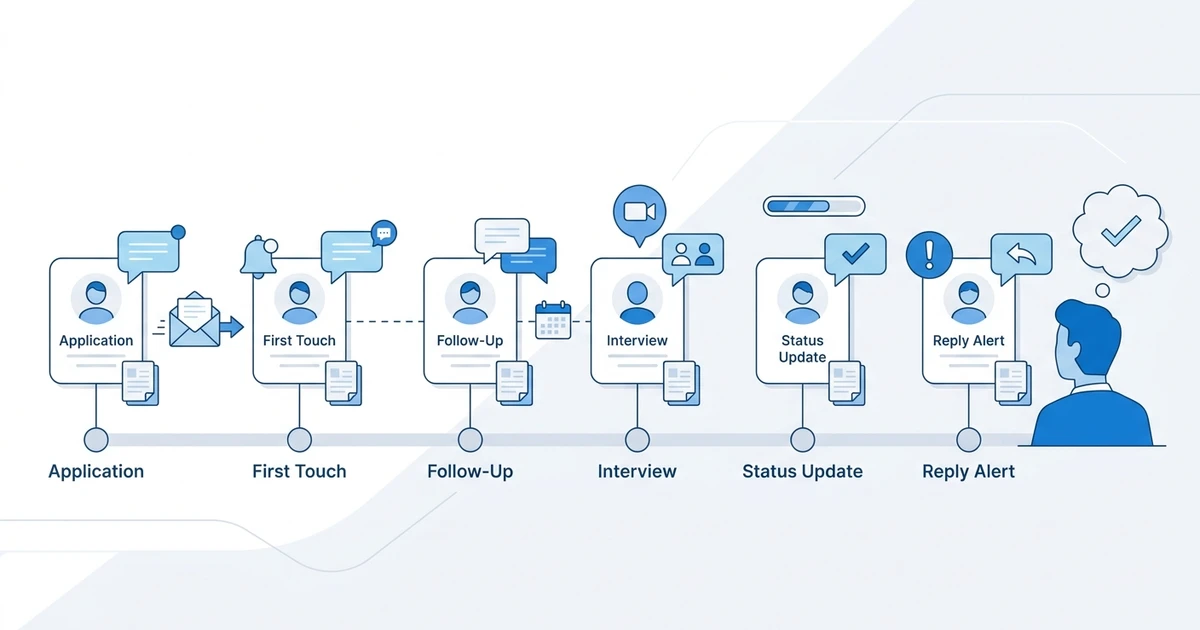
It should not blast every candidate with the same message. It should help recruiters send the right message at the right stage, then make replies visible so the recruiter can act quickly.
| Candidate moment | Automation should do |
|---|---|
| Application received | Confirm receipt and set expectations |
| Candidate sourced | Create a specific first-touch draft or task |
| No response | Send a useful follow-up with one clear action |
| Interview scheduled | Send logistics and preparation details |
| Status changes | Give an honest update when appropriate |
| Candidate rejected | Close respectfully or route to nurture |
| Candidate goes cold | Create a reactivation task or sequence |
| Candidate replies | Alert the recruiter while intent is fresh |
The recruiter still owns the relationship. The CRM keeps the timing from slipping.
Application Confirmation Automation
Application confirmation is the lowest-risk candidate engagement automation.
When a candidate applies, the automation can confirm that the application was received, identify the role, explain the next step, and avoid promising a timeline the team cannot support.
A good confirmation message includes:
- Role name
- Application received note
- What happens next
- Whether only shortlisted candidates will be contacted
- Link or instruction for updating details
Keep it plain. A confirmation message should reduce uncertainty, not sound like a marketing email.
Passive Candidate First-Touch Automation
Passive candidates need more care than active applicants.
Automation can help structure the first touch, but the message should still use real context. A passive candidate should see why the recruiter reached out, why the role may fit, and what the next step would be.
Weak version: “I was impressed by your profile and have an exciting opportunity.”
Better version: “I noticed your recent SaaS implementation work and thought this customer success operations role may be relevant. Open to a quick look?”
Use automation to prepare the draft, assign the task, or place the candidate in the right sequence. Let the recruiter check the message before sending when the role is important.
No-Response Follow-Up Automation
Many candidates miss the first message. That does not always mean they are not interested.
A no-response automation can send one or two follow-ups after a defined delay. The follow-up should add context or reduce friction.
Good follow-ups can:
- Clarify the role fit.
- Share remote, hybrid, compensation, or seniority context when available.
- Offer a yes or no reply path.
- Ask whether future roles would be more relevant.
- Give the candidate a simple opt-out.
Want follow-ups to stay connected to candidate records instead of living in inbox memory? Explore ATZ CRM workflow automation and trigger sequences, alerts, and CRM updates from candidate activity.
In ATZ CRM, those follow-ups can be connected to candidate stages, owner alerts, and activity history. That means recruiters can see who replied, which sequence they came from, and what the next action should be without switching between a CRM, an inbox, and a separate automation tool.
Interview Reminder Automation
Interview reminders are simple, but they prevent avoidable confusion.
When a candidate reaches interview stage, the automation can send a reminder with date, time zone, meeting link or location, interviewer, format, documents, preparation notes, and rescheduling instructions.
The safest version checks that key details are present before sending.
| Required detail | Why it matters |
|---|---|
| Date and time zone | Prevents missed interviews |
| Meeting link or location | Removes last-minute searching |
| Interview format | Helps the candidate prepare |
| Contact person | Gives candidates a fallback |
| Rescheduling instruction | Reduces no-shows |
If any of those details are missing, create a recruiter task instead of sending an incomplete message.
Stage Update Automation
Candidates do not need an update for every internal stage. They need updates when the status affects them.
Good candidate-facing stages include screening, submitted, interview, offer, rejected, and nurture. Internal review stages may be better as recruiter alerts, not candidate messages.
Stage updates should be honest:
- If the role is paused, say it is paused.
- If there is no timeline, do not invent one.
- If only shortlisted candidates move forward, say that clearly.
- If the client is reviewing, avoid sharing confidential details.
Candidate engagement automation is not useful if it sends fast but inaccurate updates.
Rejected Candidate Nurture Automation
Rejected candidates can still become future placements, referrals, or clients.
A rejection-to-nurture automation can help recruiters close the loop respectfully, then keep the right candidates warm for future roles.
Do not use one rejection message for every situation. Separate candidates by reason:
| Rejection reason | Better next step |
|---|---|
| Not enough required experience | Close politely and tag for future level |
| Strong but not selected | Nurture and reactivation list |
| Role paused | Update when the role reopens |
| Compensation mismatch | Tag preferred range |
| Location mismatch | Tag location preference |
The message should not create false hope. It should be respectful, clear, and useful.
Talent Pool Reactivation Automation
Talent pool reactivation is most effective when it is specific.
Do not send a generic “checking in” email to every old candidate. Reactivate candidates when there is a reason: a relevant role, a market update, a past placement relationship, a strong skill match, or a previous conversation worth reopening.
Useful reactivation triggers include:
- Candidate has not been contacted in a defined period.
- Candidate matches a live job skill.
- Candidate was previously shortlisted.
- Candidate was placed before.
- Candidate updated availability.
- Candidate belongs to a priority talent pool.
The best reactivation message tells the candidate why now.
Hot Candidate Alert
Candidate engagement is not only candidate-facing.
Sometimes the best automation alerts the recruiter while the candidate is warm. For example, a hot candidate alert can fire when a candidate replies, updates availability, reaches interview stage, receives a strong AI match score, or gets assigned to a high-priority role.
The alert should include enough context to act:
- Candidate name
- Job or talent pool
- Trigger event
- Recruiter owner
- Last activity
- Suggested next step
- Link to candidate record
This keeps speed high without making the candidate receive unnecessary messages.
Message Quality Checklist
Before turning on a candidate engagement automation, review the message like a candidate would.
Ask:
- Does it explain why the recruiter is reaching out?
- Does it match the candidate’s stage?
- Does it ask for one clear action?
- Is the tone human and restrained?
- Is the message true if the recruiter is busy?
- Can the candidate opt out or redirect the conversation?
- Will the recruiter see the reply quickly?
If the message would feel awkward coming from a real recruiter, rewrite it before automating it.
Metrics to Track
Candidate engagement automation should improve movement and trust.
Track:
- Reply rate by sequence
- Time to first response
- Interview confirmation rate
- No-show rate
- Candidate drop-off by stage
- Opt-out rate
- Re-engagement replies
- Recruiter response time after candidate reply
Do not judge automation only by messages sent. A sequence that sends fewer messages and earns better replies is stronger than a long sequence that creates opt-outs.
Frequently Asked Questions
What is candidate engagement automation?
Candidate engagement automation uses sequences, reminders, tasks, alerts, and CRM triggers to keep candidates informed throughout the hiring process. It improves timing and consistency while recruiters stay responsible for relationship quality.
What candidate messages should recruiters automate first?
Start with application confirmations, interview reminders, no-response follow-ups, stage updates, rejected candidate nurture, profile update requests, and hot candidate alerts. These are frequent, easy to inspect, and valuable for candidate trust.
Can candidate engagement automation feel personal?
Yes, when messages use real candidate context and stay specific. Automation should handle timing and routing, while recruiters personalize important outreach, sensitive updates, and offer conversations.
Can ATZ CRM automate candidate follow-ups?
Yes. ATZ CRM can use sequences, candidate stages, workflow triggers, recruiter alerts, and CRM updates to help teams follow up with candidates and keep replies connected to the candidate record.
How often should recruiters review automated sequences?
Review automated candidate sequences at least monthly. Check reply rates, opt-outs, outdated role language, broken triggers, stage accuracy, and whether recruiters are responding quickly after candidates reply.
Final Thoughts
Candidate engagement automation should make candidates feel less ignored, not more processed.
Use it for the moments where timing matters: confirmations, reminders, follow-ups, stage updates, reactivation, and recruiter alerts. Keep the messages specific, keep the recruiter visible, and pause anything that creates noise.
For a broader candidate communication foundation, read the candidate engagement guide or explore email campaigns for recruiters to connect outreach with your recruiting CRM.