EN
EN DE
DE ES
ES FR
FR NL
NL PT
PT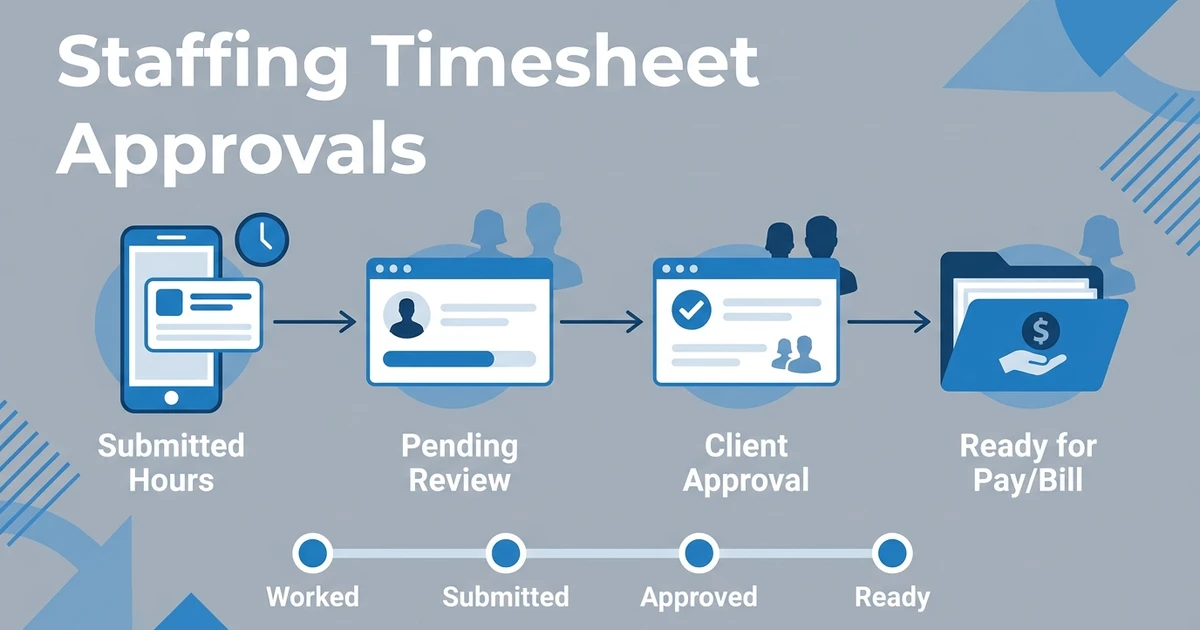





Quick Answer: Staffing agency timesheet software helps temporary and contract staffing teams collect candidate hours, route them for client approval, and keep payroll or billing handoff visible. The best setup connects each timesheet to the job, shift, candidate, client, and placement record so recruiters are not chasing hours through spreadsheets, PDFs, and email threads.
Timesheets look simple until your agency is managing multiple clients, changing shifts, and workers who submit hours in different formats. Then time capture becomes a weekly admin drain.
For staffing agencies, the problem is not only collecting hours. The real problem is knowing which hours are missing, submitted, approved, queried, or ready for the next finance step.
The American Staffing Association reports that nearly 2.2 million temporary and contract employees worked for America’s staffing companies during an average week in 2024 in its staffing industry statistics. ASA also reported an average of two million temporary and contract workers per week in Q4 2025 in its quarterly staffing update.
What Is Staffing Agency Timesheet Software?
A staffing timesheet workflow collects candidate or worker hours, sends those hours to clients for review, and keeps approval status visible to the agency. It is different from generic time tracking because staffing agencies also need job, client, placement, and billing context.
A useful timesheet workflow should answer practical questions quickly. Who submitted hours? Which client needs to approve them? Which shift or assignment do they belong to? What is still blocked before payroll or billing handoff?
If your tool cannot answer those questions, your recruiters will keep chasing updates manually.
Why Spreadsheet Timesheets Break for Temp Staffing Agencies
Spreadsheets can work when you have only a few active workers. They become fragile when you add more clients, sites, shifts, and approval contacts.
The common failure points are familiar:
- Workers submit late or in the wrong format.
- Clients approve in different email threads.
- Recruiters cannot see pending approvals.
- Finance has to recheck missing details.
- Disputes have no clean audit trail.
The issue is not that spreadsheets are bad. The issue is that they are passive. They store data, but they do not move the approval workflow forward.
Best Timesheet Software Features for Staffing Agencies to Check
When you compare timesheet platforms for staffing agencies, do not start with the timesheet screen alone. Start with the full workflow from shift worked to client approval.
Look for:
- Candidate portal submission
- Client approval workflow
- Shift and job connection
- Timesheet status tracking
- Approval reminders
- Notes for questions or disputes
- Payroll or billing handoff
- Permissions and audit history
- Mobile-friendly access
The best systems make timesheets part of your staffing workflow. A standalone time tracker may collect hours, but your team still needs to connect those hours to candidates, clients, jobs, and placements.
Candidate Portal vs Client Portal for Timesheets
A candidate portal is where workers submit hours, check what they have sent, and manage staffing-related actions. For temp and contract teams, this reduces the need for email attachments and one-off messages.
A client portal is where hiring managers or supervisors review, approve, query, or reject those hours. That matters because client approval is usually the step that turns submitted time into usable pay and bill information.
ATZ CRM supports both sides of that workflow. The candidate portal helps candidate-facing activity stay organized, while client portal software helps agencies move client review out of scattered email threads.
If your team is chasing timesheets through inboxes, use ATZ CRM to see how candidate timesheets, shifts, placements, and client approvals can sit in one recruitment workflow. Request a demo with your current approval process.
How ATZ CRM Handles Timesheets Inside the Staffing Workflow
ATZ CRM connects timesheet activity with the broader recruitment record. That means your team can work from candidate, client, job, shift, and placement context rather than treating timesheets as a separate back-office file.
The platform includes help workflows to manage shifts and timesheets and track contracts, shifts, timesheets, and invoicing. For agencies managing contract staffing, contract staffing software context helps keep assignments and commercial details visible.
This is important for mixed agencies. If you handle permanent roles and temporary assignments, you should not have to split your client and candidate history across different systems.
Is ATZ CRM the Right Timesheet Fit for Your Agency?
ATZ CRM is a good fit if timesheets need to stay connected with candidate records, client accounts, shifts, placements, and approvals. It also fits teams that manage temp or contract roles alongside permanent recruitment.
It may not be the first fit if you only want standalone payroll processing or a simple employee clock-in app. In that case, a narrow timekeeping product may be enough.
For a staffing agency, the bigger question is whether your timesheet process helps recruiters serve clients faster. If approvals are hidden in inboxes, your team is already working with incomplete visibility.
Frequently Asked Questions
What is a timesheet tool for staffing agencies?
A staffing timesheet tool helps agencies collect candidate hours, send them for client approval, and track status. The best systems connect time submission to candidates, jobs, shifts, clients, and placements.
Can staffing agencies use Excel for timesheets?
Yes, but Excel is best for very small or early workflows. It does not give you built-in submission, client approval, reminders, access control, or a clean audit trail.
Should candidates submit timesheets through a portal?
Yes. A candidate portal gives workers a consistent place to submit hours and helps your agency avoid missing emails or inconsistent formats.
How do clients approve staffing agency timesheets?
Clients can approve timesheets by email, PDF, or portal. A client portal is usually stronger because it keeps approvals, questions, and status tied to the correct client and placement.
Does ATZ CRM include candidate timesheet workflows?
Yes. ATZ CRM supports candidate portal timesheets, shift tracking, contracts, and client portal workflows so staffing teams can manage time capture inside the recruitment workflow.
Choose Timesheet Software That Keeps Recruiters, Clients, and Candidates Aligned
Timesheets should not sit outside your recruitment system if your recruiters need to answer client questions, track active placements, or follow up with candidates. They belong near the job, shift, client, and candidate record.
That is the difference between storing hours and managing a staffing workflow. One creates a file. The other gives your team control.
Book a demo and walk through your current timesheet approval process inside ATZ CRM.