
Recruitment activity trend shows whether new recruitment work is building, holding steady, or slowing down. Use it for a weekly desk review or a longer planning conversation.
Choose the Period and Grouping
- Open Recruitment activity trend in Reports, or find the widget on Home.
- Open its filters or settings.
- Choose a date range and, where permitted, a team.
- Decide whether archived records should be included.
- Choose Auto, Day, Week, or Month grouping.
- Apply the settings.
The grouping changes how the period is displayed; it does not turn applications into unique candidates.
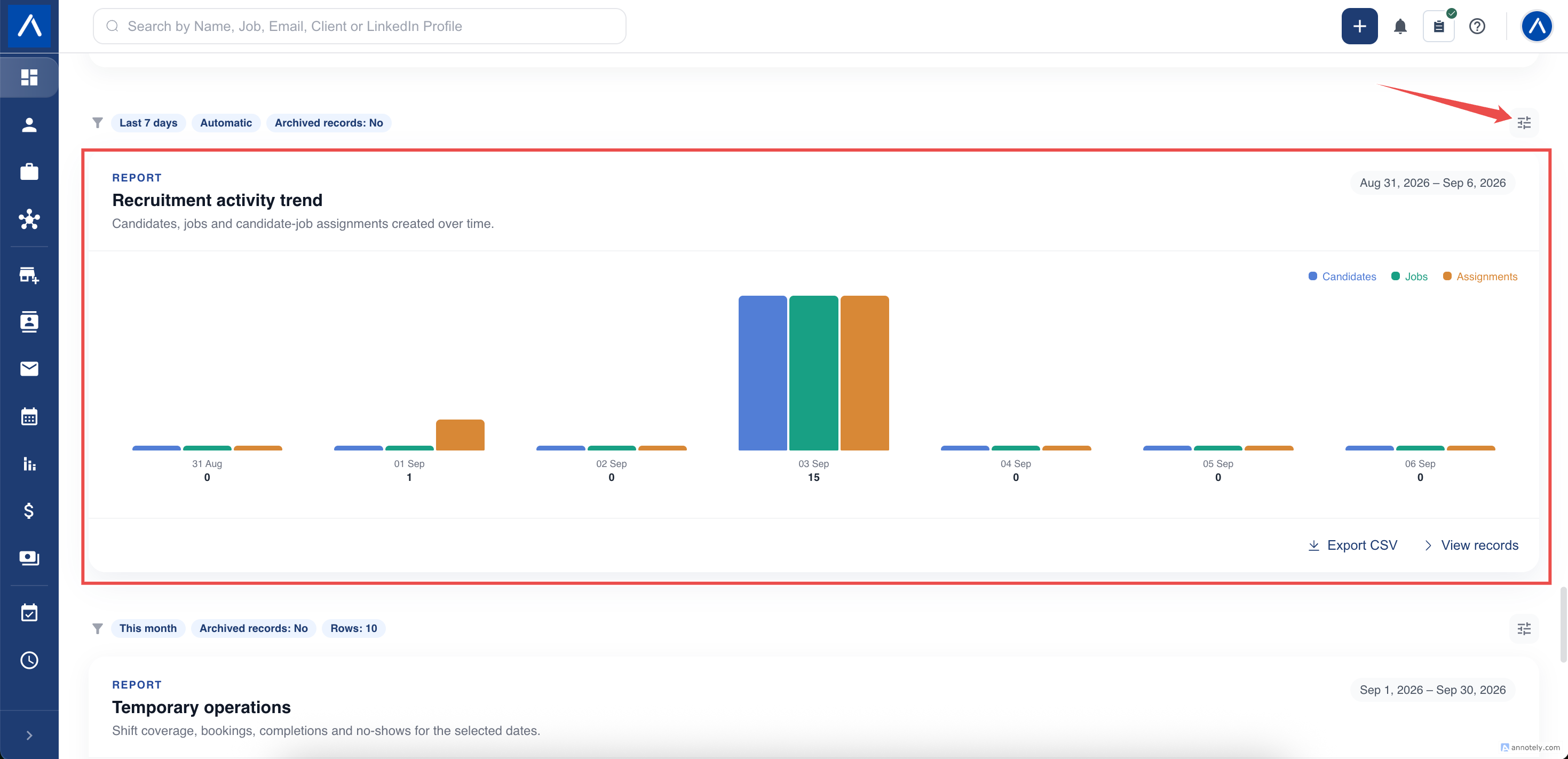
Read the Three Measures
Candidates added counts candidate profiles created during the period.
Jobs added counts job records created during the period.
Applications counts candidate-to-job assignments created during the period. These can involve candidates or jobs that already existed.
Hover over a bar to see its value. A rise in applications alongside fewer new profiles can indicate more work with your existing candidate pool, not necessarily a reporting problem.
Use Trends in a Recruitment Review
Compare periods of similar length and consider holidays, recruitment campaigns, and changes in team capacity. A partial current week should not be judged as though it were a completed week.
A quiet period in this chart does not mean no work happened. Recruiters may have been interviewing, closing offers, or completing other activities that these three measures do not count.
For outcome-based comparisons, use Goals and Competition KPIs alongside this trend.
Check an Unexpected Result
Check the applied date range, archive choice, and team. If you compare the widget with its report page, use the same settings.
For a Team view, current permissions still determine what you may see. Historical team activity is not simply every record currently owned by anyone on today’s team.
If a period remains empty after checking the filters, inspect a relevant permitted record and its creation or assignment date before asking support to investigate.
FAQs
Does this chart show completed calls or interviews?
No. It tracks candidates, jobs, and candidate-to-job applications added. Use activity or stage KPIs for calls and interviews.
Why are there more applications than candidates?
Applications are assignments to jobs. One candidate can be assigned to several jobs, including candidates created before the selected period.