
AI Notetaker helps recruiters capture meeting recordings and transcripts from scheduled activities.
Quick Answer
Add a valid meeting link to a future activity, enable AI Notetaker, save the activity, and review the recording/transcript after the meeting is processed.
Before You Start
Confirm:
- AI Notetaker is enabled for your user.
- Calendar or meeting integration is connected.
- The activity has a valid meeting link.
- The activity is scheduled for the future.
- The activity type supports meeting links.
Add AI Notetaker to an Activity
- Create or edit a future activity.
- Add a Google Meet, Zoom, or supported meeting link.
- Turn on Enable AI Notetaker.
- Save the activity.
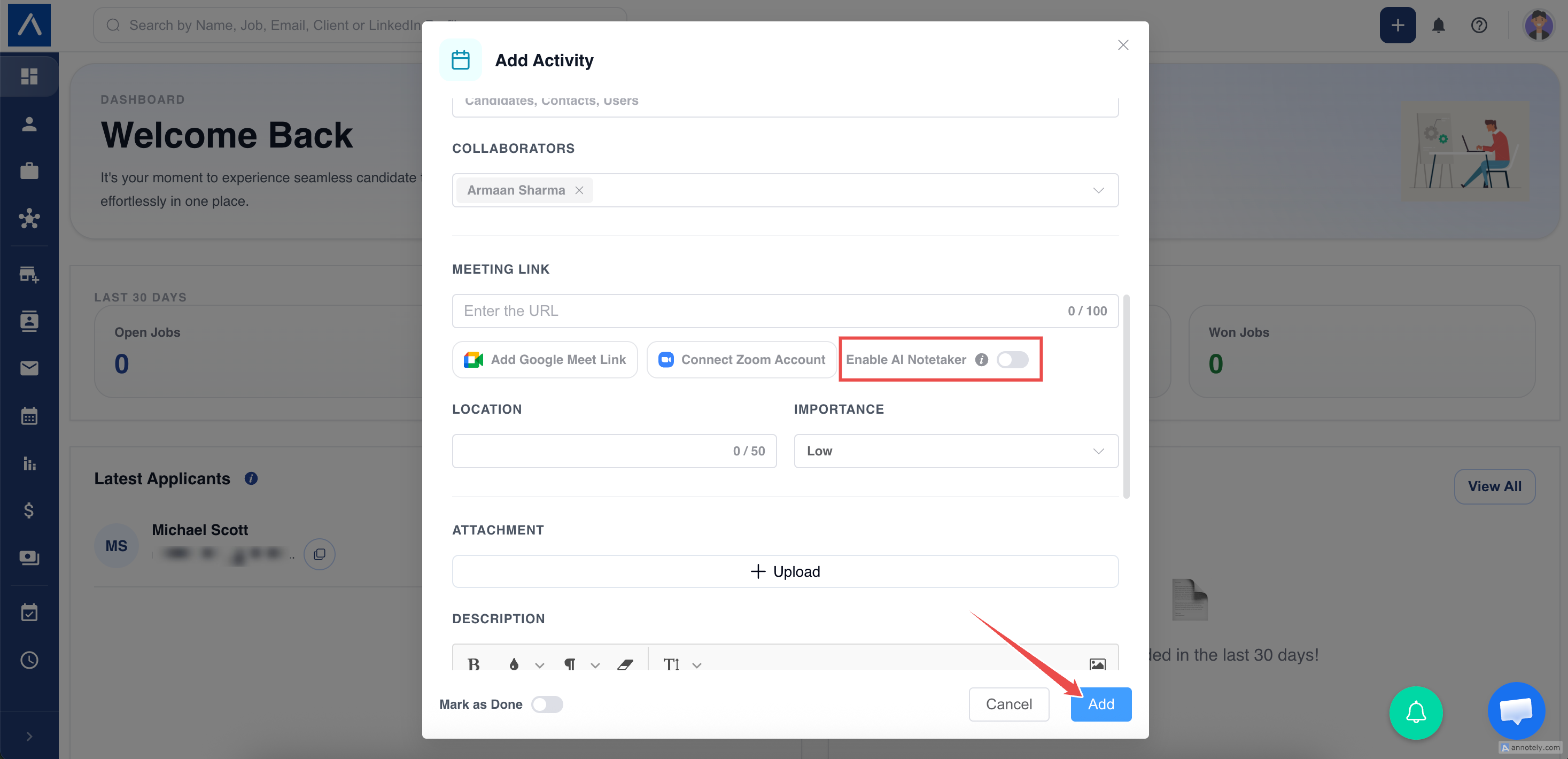
AI Notetaker needs a valid meeting link. If no valid link exists, ATZ CRM will not add the notetaker.
Edit or Remove AI Notetaker
For future activities, edit the activity and turn off AI Notetaker before the meeting starts. Past activities cannot be changed the same way because the meeting has already happened.
View Recording and Transcript
After processing, the activity list shows recording and transcript options when available.
Open the completed activity and review the meeting recording or transcript.
Use AutoSense with Meeting Transcripts
Open the meeting transcript, click AutoSense, choose Extract Key Points, Improve, or Summarize, and insert the result as the activity description.
Best Practices
- Tell participants when the meeting is recorded or transcribed.
- Use clear meeting titles.
- Link the activity to the related candidate, contact, job, organization, or deal.
- Review transcripts before using them as final notes.
Troubleshooting
Toggle Is Disabled
AI Notetaker may not be enabled for your user or the activity may not be eligible.
Meeting Link Is Invalid
Add a valid Google Meet, Zoom, or supported meeting URL.
Recording Is Not Visible Yet
Meeting media may still be processing.
FAQs
Can AI Notetaker join any activity?
No. The activity needs a supported future meeting link.
Can I remove the notetaker?
Yes, for future activities before the meeting starts.
Does AI Notetaker create summaries automatically?
It provides transcript and recording access; use AutoSense for summaries.