
What Free Job Board Posting Does
Free job board posting helps recruiters increase job visibility without manually reposting every role across multiple platforms. ATZ CRM can distribute eligible jobs to supported boards after required job data is complete.
Supported boards in the source help article include Indeed, CareerJet, LinkedIn, ZipRecruiter, Jooble, Monster, Jora, Dr Job, MyJobHelper, and PostJobFree.
Important Publishing Rules
Free job boards are useful, but they have limits:
- Boards may prioritize paid listings.
- Each platform has its own requirements.
- Most boards do not send complete publication or applicant-count feedback to ATS platforms.
- Job publication may take 24-48 hours.
- Job titles should be clear and usually under 80 characters.
- Job descriptions should be longer than 150 characters.
- Many free boards expire posts after around 30 days and may require a new listing to republish.
Required Job Fields
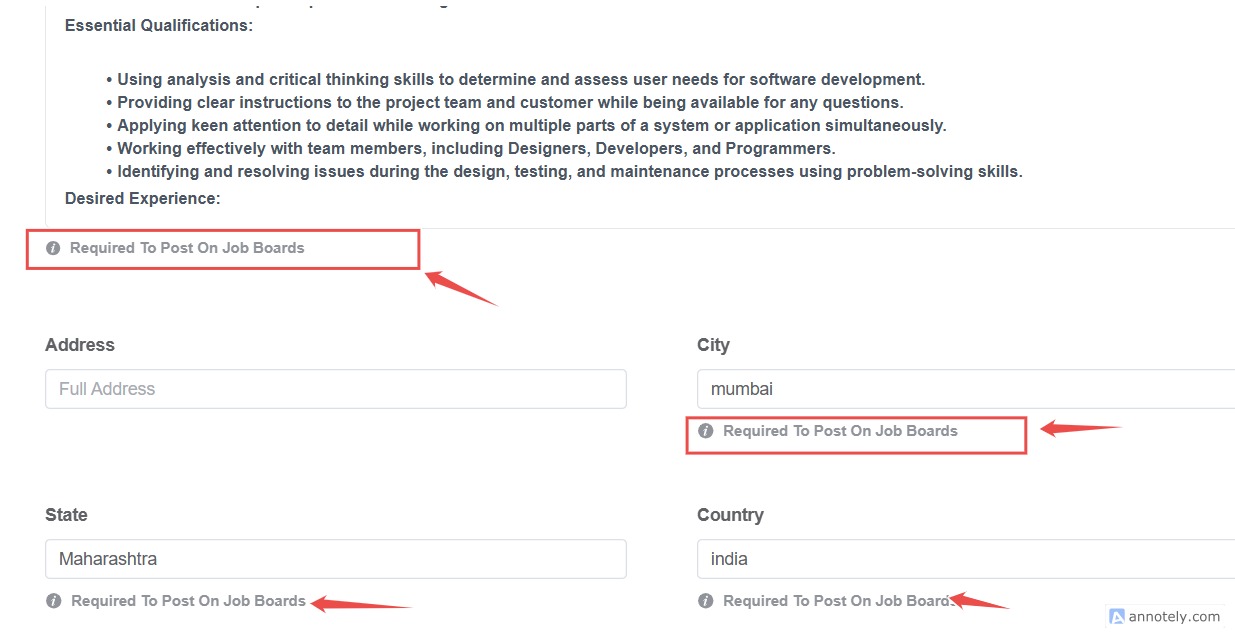
Before a job can be distributed, complete:
- Job description
- City
- State
- Country
- Enabled job application page
Recommended fields include:
- Minimum salary
- Maximum salary
- Minimum experience
- Maximum experience
Enable Free Job Board Posting
Step 1: Create or Open a Job
Create a job from the global add button or from the Jobs section.
Step 2: Complete Job Details
Fill the job form and ensure required job board fields are complete.
Step 3: Confirm Eligibility
Once the job meets the criteria, ATZ CRM can post the job to linked free job boards dynamically.
Use Cases
Increase Organic Job Reach
Use free boards to reach more candidates without adding paid advertising spend.
Save Recruiter Time
Avoid manually copying job posts into multiple free job board forms.
Standardize Job Distribution
Use required fields to keep job posts complete and consistent.
Troubleshooting
Job Is Not Appearing on Free Boards
Check required fields, job application page visibility, and job status.
Job Board Rejects or Does Not Publish the Job
Review the board’s posting requirements, title length, description quality, and duplicate posting rules.
Applicants Are Not Flowing Back
Confirm the job application link is enabled and the board is using the correct apply URL.
Frequently Asked Questions
Do I need an Indeed account?
The source article notes that Indeed requires an Indeed account.
Can inactive or closed jobs appear on boards?
Job visibility depends on job status and application form visibility. Use job status and application link settings to control visibility.
Should I write longer job descriptions?
Yes. Job descriptions should be complete, clear, and usually longer than 150 characters for better board compatibility.