
The ATZ CRM MCP Server connects ATZ CRM with MCP-compatible AI assistants such as ChatGPT, Claude, Gemini, and similar clients.
Quick Answer
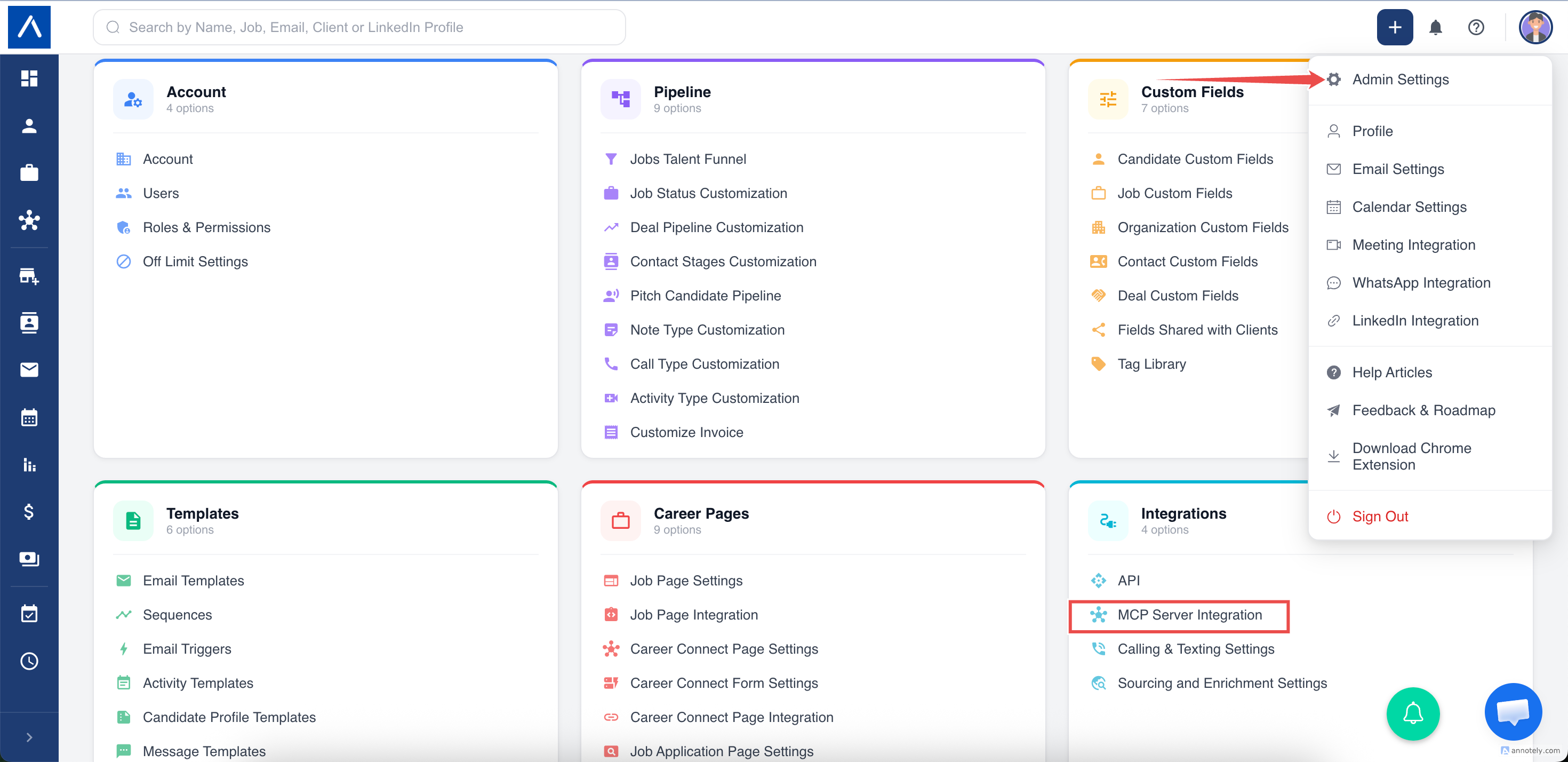
Enterprise admins can generate an MCP Server URL from Admin Settings > Integrations > MCP Server Integration. Treat the URL like a password, connect it to an MCP client, and review tool calls before approving actions.
What Is MCP?
MCP stands for Model Context Protocol. It is an open standard that lets AI applications connect to external systems, tools, and data sources.
For ATZ CRM, MCP lets an AI assistant securely request CRM information or perform approved actions without copying data manually between tools.
What the ATZ CRM MCP Server Can Help With
AI assistants can use approved tools to:
- Search candidates, jobs, organizations, contacts, matches, notes, and deals.
- Read candidate, job, organization, and contact details.
- Create or update candidates, jobs, organizations, and contacts.
- Add or update individual candidate work-history and education-history entries.
- Create notes and activities.
- Create candidate-job matches.
- Update match stages.
- Read metadata required for CRM workflows.
- Write supported account-specific custom fields after looking up their metadata.
Availability
MCP Server Integration is available for Enterprise plan accounts.
You need admin settings access, integration management permission, and a compatible MCP client.
Security Notes
Your MCP Server URL is a credential. Anyone with the URL may be able to connect an MCP client to your ATZ CRM account depending on enabled access.
Do not share it publicly. Rotate it if exposed. Disable MCP when not in use.
ATZ CRM stores only the hashed token. The raw URL is shown only when generated or rotated.
Generate Your MCP Server URL
- Log in to ATZ CRM.
- Go to Admin Settings.
- Open Integrations.
- Click MCP Server Integration.
- Review the warning.
- Click Generate URL.
- Copy the MCP Server URL.
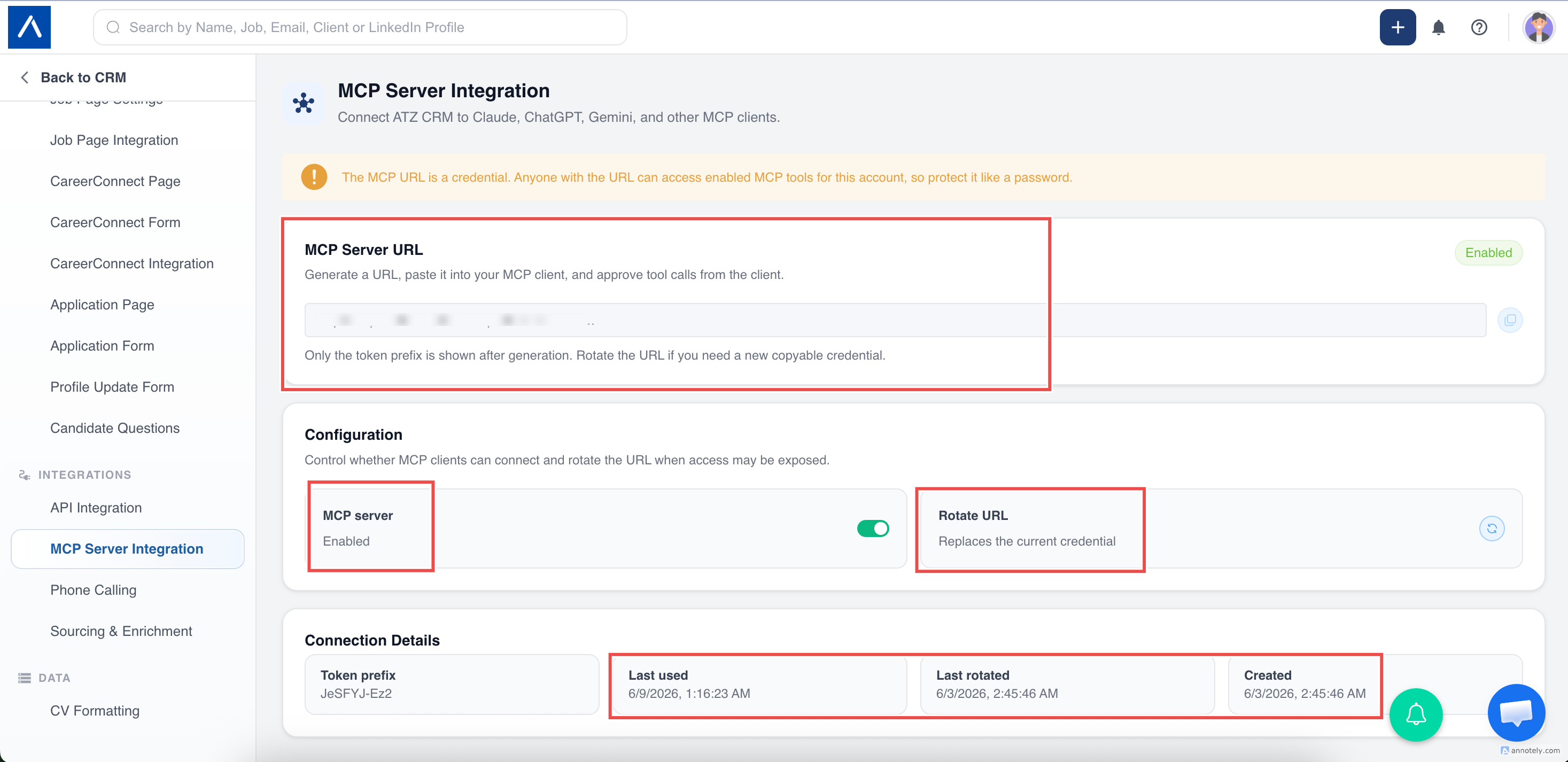
The full URL is shown only once. If you lose it, rotate the URL.
Rotate or Disable MCP
Use Rotate URL when the URL may have been shared, an employee leaves, or you need a new copyable credential.
Use the MCP Server toggle to disable MCP access when your team is not using it.
Connect to an AI Client
For ChatGPT, Claude, Gemini, or another compatible client:
- Open connector or MCP settings.
- Add a custom connector.
- Name it ATZ CRM.
- Paste the MCP Server URL.
- Choose No authentication if prompted.
The MCP URL itself is the credential.
Common Use Cases
Candidate Search
Ask for candidates with specific skills, location, role, or notes.
Interview Prep
Ask the assistant to read a candidate, job, and notes, then create a prep brief.
Candidate Profile Maintenance
Ask the assistant to add or correct candidate work and education history. Each action changes one row and does not replace or delete other history entries.
Client Meeting Brief
Ask for organization, contacts, open jobs, and recent notes.
Pipeline Review
Ask for matches grouped by stage and suggested next actions.
Best Practices
- Use specific names, emails, titles, and companies.
- Ask for tables, shortlists, briefs, or drafts.
- Review tool calls before approval.
- Review duplicate handling and linked organization/contact details before approving creates.
- Rotate the MCP URL if exposed.
- Disable MCP when not needed.
Troubleshooting
I Cannot Generate a URL
MCP URL generation is available only for Enterprise accounts.
AI Client Cannot Connect
Check the URL, MCP enabled status, URL rotation, custom MCP support, and authentication setting.
URL Is Masked
Rotate the URL to get a new full copyable credential.
Search Results Are Weak
Use more specific skills, locations, job titles, organization names, or Boolean terms.
A Create Action Found an Existing Record
ATZ CRM protects against common duplicates. By default, it fills only blank supported fields on the existing record and keeps populated data unchanged. A separate record is created only when the request explicitly uses the create-new duplicate policy.
FAQs
Does MCP expose delete actions?
No. MCP write actions are designed to be non-destructive.
Are tool requests reviewed?
Most MCP clients ask before running tools. Review write actions carefully.
Is MCP rate-limited?
Yes. It follows ATZ CRM Open API request policy and uses pagination/caps for stability.